
Chevrolet Silverado: Driving and Operating
Chevrolet Silverado 2019-2026 Owners Manual / Driving and Operating
- Driving Information
- Driving for Better Fuel Economy
- Distracted Driving
- Defensive Driving
- Drunk Driving
- Braking
- Steering
- Off-Road Recovery
- Loss of Control
- Off-Road Driving
- Driving on Wet Roads
- Hill and Mountain Roads
- Winter Driving
- If the Vehicle Is Stuck
- Vehicle Load Limits
- Truck-Camper Loading Information
- Starting and Operating
- New Vehicle Break-In
- Ignition Positions (Keyless Access)
- Ignition Positions (Key Access)
- Starting the Engine
- Stop/Start System
- Engine Heater
- Retained Accessory Power (RAP)
- Shifting Into Park
- Shifting out of Park
- Active Fuel Management
- Extended Parking
- Engine Exhaust
- Automatic Transmission
- Drive Systems
- Brakes
- Electric Brake Boost
- Antilock Brake System (ABS)
- Electric Parking Brake
- Brake Assist & Hill Start Assist (HSA)
- Ride Control Systems
- Traction Control/Electronic Stability Control
- Hill Descent Control (HDC)
- Driver Mode Control
- Limited-Slip Differential
- Locking Rear Axle
- Cruise Control
- Driver Assistance Systems
- Driver Assistance Systems
- Assistance Systems for Parking or Backing
- Forward Collision Alert (FCA) System
- Automatic Emergency Braking (AEB)
- Front Pedestrian Braking (FPB) System (1500 Series)
- Side Blind Zone Alert (SBZA)
- Lane Change Alert (LCA) (1500 Series)
- Lane Departure Warning (LDW) (2500/3500 Series)
- Lane Keep Assist (LKA) (1500 Series)
- Fuel
- Top Tier Fuel
- Recommended Fuel (Except 6.2L V8 Engine)
- Recommended Fuel (6.2L V8 Engine)
- Prohibited Fuels
- E85 or FlexFuel
- Filling the Tank (Pickup Model)
- Filling the Tank (Chassis Cab Model)
- Filling a Portable Fuel Container
- Trailer Towing
- Driving Characteristics and Towing Tips
- Parking on Hills
- Launching and Retrieving a Boat
- Trailer Towing
- Towing Equipment
- Trailer Sway Control (TSC)
- Trailering App
- Conversions and Add-Ons
 Service
All vehicles have a label underhood that identifies the refrigerant used in the
vehicle. The refrigerant system should only be serviced by trained and certified
technicians...

Other information:
Chevrolet Silverado 2019-2026 Owners Manual: Trailer Towing
If equipped with a diesel engine, see the Duramax diesel supplement. Caution Towing a trailer improperly can damage the vehicle and result in costly repairs not covered by the vehicle warranty. To tow a trailer correctly, follow the directions in this section and see your dealer for important information about towing a trailer with the vehicle...
Chevrolet Silverado 2019-2026 Owners Manual: Programming Transmitters to the Vehicle
Only RKE transmitters programmed to the vehicle will work. If a transmitter is lost or stolen, a replacement can be purchased and programmed through your dealer. The vehicle can be reprogrammed so that lost or stolen transmitters no longer work. Each vehicle can have up to eight transmitters matched to it...
Categories
- Manuals Home
- 4th Generation Silverado Owners Manual
- 4th Generation Silverado Service Manual
- Power Outlets
- Driver Information Center (DIC) (Base Level)
- Instrument Panel Overview
- New on site
- Most important about car
Passenger Sensing System
The vehicle has a passenger sensing system for the front outboard passenger position. The passenger airbag status indicator will light on the overhead console when the vehicle is started.
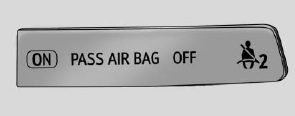
United States
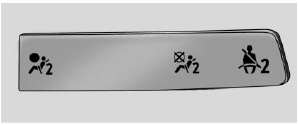
Canada

Copyright © 2026 www.chsilverado.com