Kia EV2: EV menu / Next departure. Departure time
|
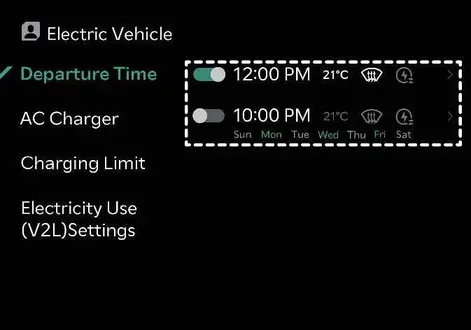
Conveniently set your anticipated departure time in advance to optimize scheduled vehicle charging cycles and achieve your preferred cabin target temperature before you even step inside your Kia EV2.
Departure time
|
|
To activate automated scheduled charging and cabin pre-conditioning tailored to your exact departure time, simply select the desired day of the week within the vehicle settings menu of your Kia EV2.
TIP
The infotainment system interface and features might evolve following future software updates. For the most up-to-date operating instructions, refer directly to the digital manual built into the infotainment system and your vehicle's quick reference guide.
 Nearby charging stations
To effortlessly search for nearby charging stations along your path, simply tap the dedicated map icon on the central infotainment system screen of your Kia EV2...
 Charging and climate
Tap the designated icon on the infotainment system screen of your Kia EV2, then easily navigate to select your preferred scheduled charging parameters and target climate control preferences...
Other information:
Kia EV2 (QV1, 2026-2026) Owner's Manual: Checking the amount of air conditioner (A/C) refrigerant and compressor lubricant
Low refrigerant levels will noticeably reduce the cooling efficiency and overall performance of your A/C system. Conversely, overfilling the refrigerant circuit creates excessive internal pressure that also adversely impacts the A/C system. If you notice any abnormal operation, reduced cooling output, or unusual noises, have your vehicle inspected immediately by a professional workshop...
Chevrolet Silverado 2019-2026 Owners Manual: Hill Descent Control (HDC)
If equipped, Hill Descent Control (HDC) sets and maintains vehicle speed while driving down steep grades in a forward or reverse gear. The HDC switch is on the center stack, below the climate controls. Press to enable or disable HDC. Vehicle speed must be below 50 km/h (31 mph)...
Categories
- Manuals Home
- 4th Generation Silverado Owners Manual
- 4th Generation Silverado Service Manual
- Maintenance Schedule
- Lower Anchors and Tethers for Children (LATCH System)
- Folding Mirrors
- New on site
- Most important about car
Keys (Key Access)
Warning
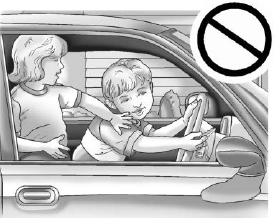
Leaving children in a vehicle with the ignition key is dangerous and children or others could be seriously injured or killed. They could operate the power windows or other controls or make the vehicle move. The windows will function with the keys in the ignition, and children or others could be caught in the path of a closing window. Do not leave children in a vehicle with the ignition key.