
Kia EV2: EV menu / Charging and climate
|
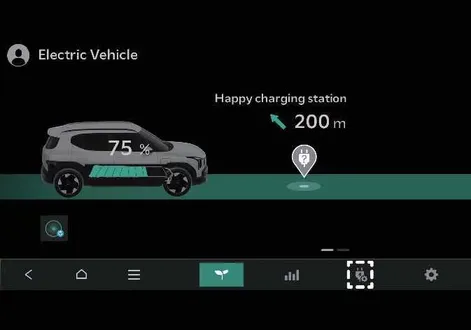
Tap the designated icon on the infotainment system screen of your Kia EV2, then easily navigate to select your preferred scheduled charging parameters and target climate control preferences.
NOTE
To utilize scheduled charging functions effectively, your vehicle must remain securely connected to an active charging cable at the pre-set scheduled time.
|
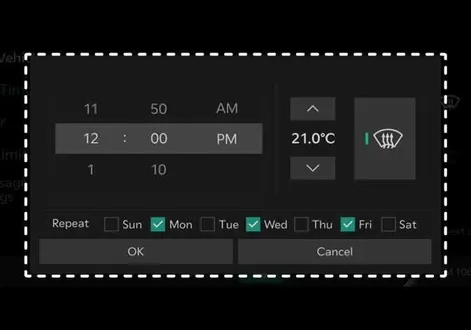
You have full flexibility to define the specific date and time windows for replenishing the high-voltage battery alongside your target cabin climate control temperature. Furthermore, you can optimize your daily energy expenses by configuring your Kia EV2 to charge exclusively during designated off-peak electricity hours.
Off-peak time settings
|
|
-
Select Start time if you want your vehicle to start charging precisely at the designated off-peak period. Otherwise, your Kia EV2 will initiate charging based on your general scheduled time.
-
Set the most cost-effective time window to complete your battery charging routine:
-
Off-peak tariffs only: If selected, active charging is strictly limited to the defined off-peak timeframe (note that the battery may not reach 100% capacity if the allotted window is insufficient).
-
Off-peak tariffs prioritised: If selected, charging focuses heavily on off-peak hours, but is permitted to continue outside of off-peak times if necessary to ensure a complete 100% charge for your Kia EV2.
-
Target temperature settings
|
|
If you want the cabin temperature of your Kia EV2 to adjust to a comfortable target level right by your departure time, configure the target temperature while your vehicle is plugged into a charging cable. Particularly in cold weather conditions, scheduling cabin heating in advance preserves driving range and optimizes overall electric vehicle performance.
 Next departure. Departure time
Conveniently set your anticipated departure time in advance to optimize scheduled vehicle charging cycles and achieve your preferred cabin target temperature before you even step inside your Kia EV2...
 Vehicle to load (V2L)
The innovative Vehicle to load (V2L) system transforms your Kia EV2 into a mobile power source, allowing the high-voltage battery to supply standard AC power to a wide variety of electronic appliances and devices...
Other information:
Kia EV2 (QV1, 2026-2026) Owner's Manual: Headlamp aiming (for Europe). Aiming point
NOTE Inflate the tyres to the specified pressure and remove any loads from the vehicle except the driver, spare tyre, and tools...
Kia EV2 (QV1, 2026-2026) Owner's Manual: Smart regeneration system settings
Electric Vehicle Smart Regeneration Tap Electric Vehicle > > Smart Regeneration > Link to Navigation Route from the infotainment system to configure your preferences...
Categories
- Manuals Home
- 4th Generation Silverado Owners Manual
- 4th Generation Silverado Service Manual
- E85 or FlexFuel
- Folding Mirrors
- Driver Information Center (DIC) (Midlevel and Uplevel)
- New on site
- Most important about car
Power Mirrors
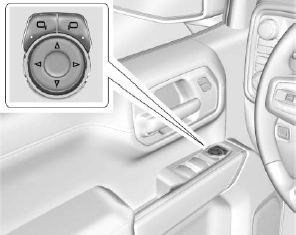
To adjust each mirror:
Press  or
or
 to select the driver or passenger side
mirror. The indicator light will illuminate.
to select the driver or passenger side
mirror. The indicator light will illuminate.
