Kia EV2: Smart regeneration system / Smart regeneration system settings
|
|
-
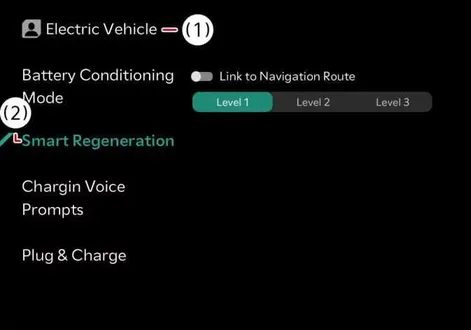
Tap Electric Vehicle >
 > Smart Regeneration > Link to Navigation Route from the infotainment system to configure your preferences.
 -
Smart Regenerative Braking Distance level allows you to adjust the distance to the vehicle ahead according to the driver's distance level (Level 1/Level 2/Level 3) for customized driving dynamics.
Navigation-based speed control
-
In the (
 ) stage, the speed is automatically adjusted using real-time navigation information.
 -
Navigation-based speed control provides more accurate information when a destination is set. If a destination is not set, some functions may not work.
-
The automatic deceleration function operates in the following situations:
-
When turning left/right at an intersection, it decelerates to an appropriate speed.
-
It decelerates to an appropriate speed on sharp curves.
-
When the speed limit on a road is lowered (90-50 km/h (56-30 mph), etc.), it decelerates to the speed limit once.
-
The automatic deceleration function for changes in road speed limits only operate in Europe.
-
It automatically decelerates to an appropriate speed just before entering a roundabout.
-
 Smart regeneration system
The innovative smart regeneration system in the Kia EV2 controls regenerative braking automatically according to the gradient of the road and the driving condition of the vehicle ahead, optimizing energy recovery...
 Smart regeneration system operation
Pull and hold the right side ( ) of the paddle shifter for approximately more than 1 second to activate smart regeneration system...
Other information:
Chevrolet Silverado 2019-2026 Owners Manual: Seat Belts
This section describes how to use seat belts properly, and some things not to do. Warning Do not let anyone ride where a seat belt cannot be worn properly. In a crash, if you or your passenger(s) are not wearing seat belts, injuries can be much worse than if you are wearing seat belts...
Kia EV2 (QV1, 2026-2026) Owner's Manual: Scheduled maintenance service for Kia EV2
Normal maintenance schedule - for Australia and New Zealand You must perform the following comprehensive maintenance services to ensure optimal vehicle performance, safety, and reliability of your Kia EV2. Keep detailed receipts for all professional vehicle services and repairs to fully protect your factory warranty...
Categories
- Manuals Home
- 4th Generation Silverado Owners Manual
- 4th Generation Silverado Service Manual
- Instrument Panel Fuse Block (Left)
- Tire Chains
- Lower Anchors and Tethers for Children (LATCH System)
- New on site
- Most important about car
Rear Camera Mirror
If equipped, this automatic dimming mirror provides a wide angle camera view of the area behind the vehicle.