
Kia EV2: Navigation-based Smart Cruise Control (NSCC): (if equipped) / Navigation-based Smart Cruise Control operation
Operating conditions
Navigation-based Smart Cruise Control functions under the following specific operational conditions:
-
You are actively operating Smart Cruise Control
-
You are driving on an eligible highway or designated main road
-
Highway Driving Assist is enabled in your Kia EV2 cluster or infotainment system settings
-
An eligible control target, such as a curve section, is detected ahead by the system
-
The current Smart Cruise Control set speed is higher than the calculated safe speed limit
TIP
For more comprehensive information about operating Smart Cruise Control, refer to Smart Cruise Control (SCC).
Navigation-based Smart Cruise Control display and control
|
When Navigation-based Smart Cruise Control is active, your Kia EV2 instrument cluster displays the following status indicators:
Navigation-based Smart Cruise Control standby
If all necessary operating conditions are fully satisfied, the green () indicator appears on the display.
Navigation-based Smart Cruise Control operating
During active speed control adjustments, the green () indicator blinks.
Navigation-based Smart Cruise Control pause/driver operation
If Smart Cruise Control cannot operate because you have manually paused it or the navigation system is actively rerouting, the gray () indicator appears on the instrument cluster.
If you have manually engaged the accelerator pedal, the white ( ) indicator blinks on the instrument cluster.
WARNING
-
A prominent warning message appears whenever Navigation-based Smart Cruise Control is temporarily unable to decelerate your Kia EV2 to a safe speed.
-
Drive carefully
-
-
Before transitioning from a highway into a general road or a highway rest area while Navigation-based Smart Cruise Control is operating.
-
When the upcoming highway exit lane is very short or sharply angled.
-
When the expected driving route cannot be accurately determined due to poor mapping data.
-
Before entering standard local roads while Navigation-based Smart Cruise Control is still actively engaged.
TIP
On-screen images, icons, or interface colors may display differently depending on the specific configuration, trim specifications, or graphical theme of your Kia EV2 instrument cluster.
Highway Curve Zone Auto Slowdown
Your Kia EV2 automatically decelerates smoothly in anticipation of upcoming highway curves based on precise navigation and road geometry data. Once the vehicle successfully negotiates and exits the curve section, it progressively accelerates back up to your pre-selected Smart Cruise Control set speed.
TIP
The precise initiation point for automatic deceleration varies dynamically depending on your current driving speed and the sharpness of the road curvature ahead. Naturally, the higher your travel speed, the earlier the system initiates deceleration to ensure a comfortable and secure cornering experience in your Kia EV2.
 Navigation-based Smart Cruise Control settings. Auto Highway Speed Change
Auto Highway Speed Change
Driver Assistance
Driving Convenience
Auto Highway Speed Change
Whilst your vehicle is ON, tap Setup > Vehicle > Driver Assistance > Driving Convenience > Auto Highway Speed Change on the infotainment system screen of your Kia EV2...
 Navigation-based Smart Cruise Control limitations
Navigation-based Smart Cruise Control on your Kia EV2 may operate abnormally, experience unexpected delays, or temporarily deactivate under the following specific circumstances:
The vehicle's built-in navigation system is experiencing a malfunction or not working properly...
Other information:
Kia EV2 (QV1, 2026-2026) Owner's Manual: Operating door locks from inside the vehicle
You can conveniently control the door locks from inside your Kia EV2 cabin using either the individual inner door handle mechanisms or the master central door lock switch. With the door handle Front door Pulling the inner door handle once when the door is locked will automatically unlock and open the door...
Kia EV2 (QV1, 2026-2026) Owner's Manual: Seat belt precautions
Take the following vital precautions when using seat belts to guarantee maximum safety during every journey inside your Kia EV2. WARNING All occupants of the vehicle must wear their seat belts at all times. Seat belts and child restraints reduce the risk of serious or fatal injuries for all occupants in the event of a collision or sudden stop...
Categories
- Manuals Home
- 4th Generation Silverado Owners Manual
- 4th Generation Silverado Service Manual
- Electronic Stability Control (ESC) Off Light
- Maintenance Schedule
- Jump Starting
- New on site
- Most important about car
Power Door Locks
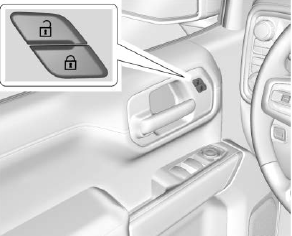
If equipped with power door locks.
 : Press to lock the doors.
