Kia EV2: Navigation-based Smart Cruise Control (NSCC): (if equipped) / Navigation-based Smart Cruise Control limitations
Navigation-based Smart Cruise Control on your Kia EV2 may operate abnormally, experience unexpected delays, or temporarily deactivate under the following specific circumstances:
-
The vehicle's built-in navigation system is experiencing a malfunction or not working properly.
-
Essential map information fails to transmit due to an abnormal software freeze or glitch on the infotainment system screen of your Kia EV2.
-
Stored map information differs significantly from the actual road layout because of real-time GPS signal inaccuracies, satellite drift, or outdated map data.
-
The onboard navigation system is actively searching for a new route while you are currently driving.
-
GPS signals are severely blocked or lost entirely, such as when driving deep inside a long tunnel.
-
The vehicle enters a highway service area, parking zone, or designated rest stop.
-
Smartphone projection features like Android Auto™ or Apple CarPlay® are actively operating and overriding system priorities.
-
The intended control target, such as an upcoming curved road section, is positioned too close to the vehicle for timely calculation.
-
The main highway road splits into multiple branching lanes and then quickly merges back together.
-
The vehicle is not being driven precisely along the active navigation guidance route.
-
The route is actively being recalculated by resetting the destination—including dynamic recalculations based on real-time traffic updates—or if active destination guidance is suddenly canceled.
-
Entering a geographic country or region where the automated navigation feature is not officially supported.
-
The legal speed limit changes abruptly on certain transitional sections of the road network.
-
Driving on entry or exit ramps connected to highway rest areas or specialized driver fatigue facilities on controlled-access roads.
-
The navigation system cannot accurately determine the precise position of your Kia EV2—for instance, when driving on elevated roadways, overpasses running directly adjacent to general surface streets, or closely parallel local roads.
-
A background system software update for the navigation platform occurs whilst you are driving.
-
The navigation system unexpectedly restarts or reboots whilst you are driving.
-
You are navigating through an active road construction zone with temporary lane shifts.
-
You are driving on a specially regulated or restricted road.
-
You are driving under severe weather conditions, such as torrential downpours, heavy snowfall, or dense fog that impacts overall sensor visibility.
-
You are driving along an exceptionally sharp or erratic curved road section.
|
|
-
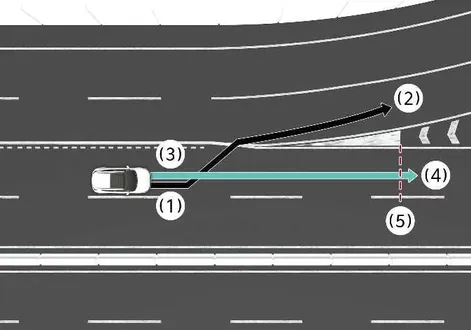
When a clear discrepancy exists between the active navigation set route (branch line) and your actual physical driving route (main road), the Highway Curve Zone Auto Slowdown feature on your Kia EV2 may not engage until the system successfully recognizes your driving path as the main road.
-
Highway Curve Zone Auto Slowdown recognizes your vehicle's driving path as the main road when you maintain the main road instead of the alternative navigation set route. Depending on the remaining distance to the upcoming curve and your current vehicle speed, your Kia EV2 may decelerate rapidly, or the automated braking intervention may feel insufficient.
|
|
-
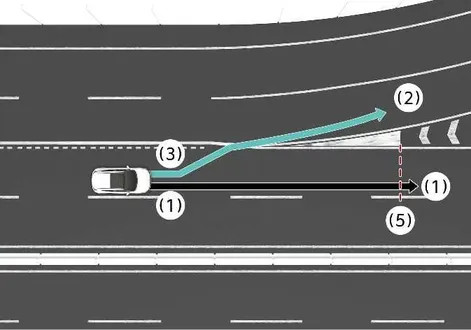
When the planned navigation route (main road) and your immediate driving route (branch line) differ, the Highway Curve Zone Auto Slowdown function may temporarily operate based on standard main road curve data.
-
When the navigation system determines that you are deviating off-route by pulling into a highway interchange or structural junction, the Highway Curve Zone Auto Slowdown function will suspend operation.
|
|
-
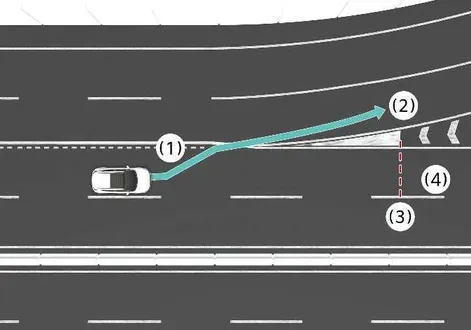
If you choose not to set an active navigation destination, the Highway Curve Zone Auto Slowdown function will execute its logic based entirely on standard curve information available for the main road.
-
Even if you intentionally depart from the main road, the Highway Curve Zone Auto Slowdown function may temporarily continue to operate based on cached navigation data regarding upcoming curved sections of the highway network.
WARNING
-
Navigation-based Smart Cruise Control is intended purely as a convenience function and is never a substitute for attentive, safe driving practices. Always keep your eyes fully focused on the road ahead. It remains your absolute legal responsibility to avoid violating local traffic laws.
-
The onboard navigation system's speed limit database may occasionally differ from newly posted physical speed limit signs. It is your ultimate responsibility to visually verify and obey the active speed limit wherever you are driving your Kia EV2.
-
Navigation-based Smart Cruise Control cancels automatically the moment you exit the controlled-access highway or main road network. Always remain fully aware of changing road and traffic conditions.
-
Navigation-based Smart Cruise Control may fail to operate correctly depending on the presence, positioning, and behavior of slower vehicles traveling directly ahead of your Kia EV2.
-
When towing a heavy trailer or hauling extra gear, your vehicle's overall deceleration capability may feel reduced or delayed. Always maintain extra stopping distance and drive with heightened caution.
-
After passing directly through a highway tollgate plaza, Navigation-based Smart Cruise Control resumes operation assuming you are in the primary lane. If you merge into an alternative lane immediately after the toll, the system might experience temporary operational delays.
-
Your Kia EV2 will actively accelerate if you depress the accelerator pedal whilst Navigation-based Smart Cruise Control is engaged. The system itself will not apply brakes during active driver pedal override. Conversely, if you feather or press the accelerator pedal too lightly, the vehicle may still initiate a slow-down response.
-
If you press and then instantly release the accelerator pedal whilst Navigation-based Smart Cruise Control is operating, your Kia EV2 may fail to decelerate sufficiently, or it may rapidly brake to re-establish a safe target speed.
-
If an upcoming road curve is structurally too sweeping or too sharp, Navigation-based Smart Cruise Control may bypass automatic adjustments or fail to engage altogether.
-
Navigation-based Smart Cruise Control is a supplemental assistance function, not a replacement for active human driver oversight. It is your core duty to constantly check travel speeds and distance gaps relative to traffic ahead, ensuring you always drive your Kia EV2 safely and cautiously.
WARNING
-
A minor temporal processing gap can occur between real-time navigation voice or visual guidance cues and the exact physical moment when Navigation-based Smart Cruise Control speed adjustments start or finish.
-
The digital speed display values shown on your instrument cluster may occasionally experience slight variances compared to the companion navigation map view.
-
Even if you are traveling at a steady speed significantly lower than your pre-set Smart Cruise Control limit, vehicle acceleration can still be restricted automatically when approaching upcoming curved road segments.
-
If Navigation-based Smart Cruise Control remains active while you exit the main highway to navigate complex interchanges, freeway junctions, or rest stop loops, the automated curve modulation may continue functioning for a short duration.
-
Deceleration applied by Navigation-based Smart Cruise Control may occasionally feel insufficient due to degraded road surface conditions, wet pavement, or narrow lane geometry. If you feel automated braking is inadequate, immediately step on the brake pedal to slow down your Kia EV2.
 Navigation-based Smart Cruise Control operation
Operating conditions
Navigation-based Smart Cruise Control functions under the following specific operational conditions:
You are actively operating Smart Cruise Control
You are driving on an eligible highway or designated main road
Highway Driving Assist is enabled in your Kia EV2 cluster or infotainment system settings
An eligible control target, such as a curve section, is detected ahead by the system
The current Smart Cruise Control set speed is higher than the calculated safe speed limit
TIP
For more comprehensive information about operating Smart Cruise Control, refer to Smart Cruise Control (SCC)...
 Highway Driving Assist (HDA): (if equipped)
Highway Driving Assist
Highway Driving Assist on your Kia EV2 expertly detects surrounding lane markings and preceding vehicles to help maintain a safe following distance and pre-selected travel speed, while simultaneously centering your vehicle precisely within the lane during extended highway journeys...
Other information:
Kia EV2 (QV1, 2026-2026) Owner's Manual: Driver assistance system limitations
When towing a trailer or using a carrier, the overall control stability and responsiveness of advanced driver assistance systems in your Kia EV2 may be reduced. In such road scenarios, it is recommended to turn off specific driver assistance functions and always maintain full manual control with heightened driving attention and safety measures...
Kia EV2 (QV1, 2026-2026) Owner's Manual: Motor Driven Power Steering (MDPS)
The Motor Driven Power Steering system in your Kia EV2 utilizes an advanced electric motor to seamlessly assist you in steering the vehicle with minimal physical effort. If the vehicle ignition is turned off or if the power steering assist system encounters an unexpected interruption, you can still manually steer the Kia EV2, though doing so will require significantly increased steering effort...
Categories
- Manuals Home
- 4th Generation Silverado Owners Manual
- 4th Generation Silverado Service Manual
- Power Outlets
- Jump Starting
- E85 or FlexFuel
- New on site
- Most important about car
Rear Camera Mirror
If equipped, this automatic dimming mirror provides a wide angle camera view of the area behind the vehicle.