
Kia EV2: Blind-Spot Collision-Avoidance Assist (BCA): (if equipped) / Blind-Spot Collision-Avoidance Assist settings
Blind-Spot Safety
|
|
Whilst the vehicle is ON, tap Setup > Vehicle > Driver Assistance > Driving Safety > Blind-Spot Safety on the infotainment system screen of your Kia EV2.
Blind-Spot Safety: Blind-Spot Collision-Avoidance Assist warns you and assists with braking depending on the collision risk levels.
|
|
When you activate Blind-Spot Collision-Avoidance Assist or restart the vehicle with this function activated, the warning light on the outside rearview mirror appears for approximately 3 seconds.
When you restart the vehicle without Blind-Spot Collision-Avoidance Assist activated, a warning message appears on the instrument cluster.
TIP
If you turn OFF Blind-Spot Safety, always be aware of your surroundings and drive safely.
NOTE
If you restart the vehicle, Blind-Spot Collision-Avoidance Assist maintains its last setting.
WARNING
-
When the vehicle is restarted, the Blind-Spot Safety is automatically selected. If you deselect to turn off the function, Blind-Spot Collision-Avoidance Assist cannot assist you. The driver should always be aware of the surroundings and drive safely.
-
Do not use the system when towing a trailer or another vehicle, or when a carrier or other equipment that may affect sensor performance or vehicle balance is installed. The system may not operate properly.
-
When connecting a trailer or carrier, set the trailer or carrier menu (if equipped). If the driver manually sets the menu or the trailer or carrier connection is automatically recognised through genuine parts, the functions of the driver assistance system may be limited. Please refer to Driver assistance system limitations and always drive with caution.
Warning Methods
|
|
|
To change the Warning Methods settings whilst the vehicle is ON, tap Setup > Vehicle > Driver Assistance > Warning Methods on the infotainment system screen of your Kia EV2. You can change the following settings:
-
Warning Volume: Adjusts the volume of the warning sound.
-
Haptic Warning: Turns ON the steering wheel vibration warning.
-
Blind-Spot Safety Warning Sound: Blind-Spot Safety Warning Sound can be turned off separately.
-
Driving Safety Priority: Lowers all other audio volumes when the Driving Safety system sounds a warning.
TIP
-
Your Warning Methods settings may apply to the Warning Methods of other driver assistance systems.
-
Warning Methods maintain their last settings when you turn OFF and restart the vehicle.
-
The setting menu may not be available for your vehicle depending on your vehicle features and specifications.
 Blind-Spot Collision-Avoidance Assist (BCA): (if equipped)
Blind-Spot Collision-Avoidance Assist can detect approaching vehicles in your blind spots and warn you of a possible collision using a warning light and an audible warning sound...
 Blind-Spot Collision-Avoidance Assist operation
Blind-Spot Collision-Avoidance Assist operates as follows:
Collision Warning (whilst driving)
Collision-Avoidance Assist (whilst departing)
Collision Warning (whilst driving)
The warning light on the instrument cluster, outside rearview mirror, and head-up display (if equipped) appear when a vehicle in either of the surrounding lanes is detected from the rear...
Other information:
Kia EV2 (QV1, 2026-2026) Owner's Manual: Checking the tyre inflation pressure
After driving briefly so as to properly distribute the sealant within the tyre and ensure structural integrity, carefully check the inflation pressure of your Kia EV2. After driving approximately 7–10 km (4–6 miles or about 10 minutes), stop at a safe, well-lit location clear of traffic...
Chevrolet Silverado 2019-2026 Owners Manual: Programming Transmitters to the Vehicle & Battery Replacement
Programming Transmitters to the Vehicle Only RKE transmitters programmed to this vehicle will work. If a transmitter is lost or stolen, a replacement can be purchased and programmed through your dealer. Each vehicle can have up to eight transmitters programmed to it...
Categories
- Manuals Home
- 4th Generation Silverado Owners Manual
- 4th Generation Silverado Service Manual
- Driver Information Center (DIC) (Midlevel and Uplevel)
- Tire Chains
- Maintenance Schedule
- New on site
- Most important about car
Blind Spot Mirrors
If equipped, there is a small convex mirror built into the upper and outer corner of the driver outside mirror. It can show objects that may be in the vehicle's blind zone.
Driving with the Blind Spot Mirror
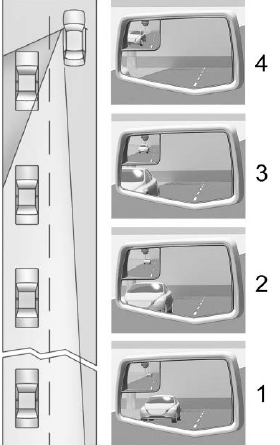
Actual Mirror View
When the approaching vehicle is a long distance away, the image in the main mirror is small and near the inboard edge of the mirror. As the vehicle gets closer, the image in the main mirror gets larger and moves outboard. As the vehicle enters the blind zone, the image transitions from the main mirror to the blind spot mirror. When the vehicle is in the blind zone, the image only appears in the blind spot mirror.