
Kia EV2: Digital Key 2 : (if equipped) / Used Vehicle/Digital Key 2 Maintenance
Purchasing used vehicle
If you have recently acquired a pre-owned vehicle, it is essential to ensure complete security and proper system integration by removing any smartphone keys or physical card keys registered by the previous owner. Please notify an authorised Kia dealer or service partner regarding the purchase of your used Kia EV2 to update ownership records and service history. Verify that any physical card key supplied with the vehicle functions correctly across all door locks and startup systems. Should the digital card key fail to operate as expected, delete its profile configuration entirely, re-register your primary smartphone key first, and subsequently program the physical card key back into the system.
Digital Key 2 Maintenance
Whenever your advanced Digital Key 2 system requires technical diagnostics, component repair, or hardware replacement at a certified service center, certain registered digital assets—such as your smartphone key or physical backup card key—may need to be temporarily deleted depending on the specific nature of the maintenance procedure.
 Personalized Profile and Vehicle Settings
When the digital key (smartphone) registered in your Kia EV2 is successfully linked with your personal user profile, the vehicle automatically adjusts to your pre-set preferences the moment you unlock and enter...
 Limitations of the System
Digital Key 2 functionality on your Kia EV2 may occasionally experience interruptions or fail to operate if any of the following technical conditions occur:
The internal battery of your smartphone or the main 12V vehicle battery is completely discharged or critically low
Near Field Communication (NFC) or Bluetooth wireless modules are disabled within your smartphone system settings
A payment credit card is stored directly against the back glass of your smartphone, or you are using a metallic enclosure or overly thick protective phone case
The physical card key is packed tightly alongside other magnetic cards, leather wallets, or metallic card holders during operation
Strong electromagnetic interference is present near high-voltage power lines, broadcasting towers, or other electronic infrastructure
There may be a communication error with Digital Key 2 NFC function if the metallic cover or communication device is attached to the smartphone...
Other information:
Chevrolet Silverado 2019-2026 Owners Manual: Engine Oil Life System
When to Change Engine Oil This vehicle has a computer system that indicates when to change the engine oil and filter. This is based on a combination of factors which include engine revolutions, engine temperature, and miles driven. Based on driving conditions, the mileage at which an oil change is indicated can vary considerably...
Kia EV2 (QV1, 2026-2026) Owner's Manual: Highway Driving Assist
Display and control The operational status of Highway Driving Assist is clearly visible within the dedicated Driving Assist cluster view on your Kia EV2 instrument panel. For comprehensive details regarding visual indicators, refer to the LCD display modes section...
Categories
- Manuals Home
- 4th Generation Silverado Owners Manual
- 4th Generation Silverado Service Manual
- Heated Steering Wheel
- Jump Starting
- Head-Up Display (HUD)
- New on site
- Most important about car
Vehicle Alarm System
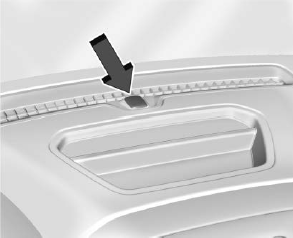
The indicator light, on the instrument panel near the windshield, indicates the status of the system.
