
Kia EV2: Highway Driving Assist operation / Highway Driving Assist
Display and control
The operational status of Highway Driving Assist is clearly visible within the dedicated Driving Assist cluster view on your Kia EV2 instrument panel. For comprehensive details regarding visual indicators, refer to the LCD display modes section.
|
|
The real-time operational status of Highway Driving Assist on your Kia EV2 appears on the instrument cluster according to the following intuitive layout:
-
Highway Driving Assist system indicator, indicating whether a vehicle ahead is detected and displaying the currently selected following distance level.
-
Green: Operating normally
-
Gray: Standby mode
-
White blinking: Accelerator pedal is currently engaged by the driver
-
Unlit: System is completely OFF
-
-
Pre-set cruising speed value
-
Detection status of a preceding vehicle and the chosen headway interval
-
Real-time lane detection status on the roadway
-
Lane Following Assist operational indicator
TIP
-
For more in-depth information concerning specific display icons, symbols, and color codes, refer to the Lane Following Assist (LFA) and Smart Cruise Control (SCC) sections.
-
The visual graphics, icons, or color palettes may vary slightly depending on your specific instrument cluster specifications, theme settings, or firmware version.
Turning on Highway Driving Assist
Highway Driving Assist engages and operates seamlessly under the following specific driving conditions:
-
Press the dedicated Drive Assist steering wheel button to turn Highway Driving Assist ON while cruising along designated controlled-access roads.
-
When transitioning onto a main highway roadway while Smart Cruise Control is active, Highway Driving Assist will not activate if the underlying Lane Following Assist function is turned OFF.
Hands-off warning
|
|
|
If you remove your hands from the steering wheel of your Kia EV2 for a few consecutive seconds, a progressive safety warning message appears accompanied by an audible alert delivered in two distinct stages:
-
First stage: Visual warning message prompting steering input
-
Second stage: Escalated visual warning (featuring a red steering wheel icon) combined with a continuous audible chime
CAUTION
-
If the Emergency Stop (ES) feature initiates and the driver continues to keep hands off the steering wheel, the complete Emergency Stop protocol will be executed. For further details, refer to the Emergency Stop (ES) section within this chapter.
-
After your Kia EV2 comes to a complete halt due to an Emergency Stop event and the stop state is subsequently released, the vehicle must be manually restarted to reactivate Highway Driving Assist.
-
When your vehicle is equipped with an in-cabin camera, Highway Driving Assist operation may be restricted if the driver's attention or facial orientation cannot be reliably detected.
|
|
|
If you fail to return your hands to the steering wheel after the initial hands-off warning sequence is issued, Highway Driving Assist will automatically deactivate and cancel itself for safety.
Driving the speed limit
|
|
|
The overall driving speed of your Kia EV2 is automatically restricted when a hands-off warning timeout causes Highway Driving Assist to cancel.
When this Driving Speed Limit safety function is actively operating, a warning notification flashes on the instrument cluster while an audible alarm sounds continuously to alert the driver.
Driving to one side within lane: (if equipped)
|
|
If an adjacent vehicle is traveling at an uncomfortably close lateral distance while your vehicle speed exceeds 60 km/h (40 mph), your Kia EV2 will dynamically adjust steering toward the opposite side of the lane to enhance travel safety. Note that if neighboring vehicles are driving closely on both sides simultaneously, this offsetting function will hold its central position rather than shifting.
Highway Driving Assist standby
If Smart Cruise Control is temporarily paused or cancelled while Highway Driving Assist is active, Highway Driving Assist shifts into a standby state while Lane Following Assist continues regular operation.
NOTE
-
The Driving Speed Limit feature helps you maintain a safe velocity below 60 km/h (40 mph) during specific events. Your vehicle smoothly decelerates to match traffic ahead, though automatic re-acceleration may be restricted until driver input is registered.
-
The Driving Speed Limit restriction is cancelled under any of the following user actions:
-
When you firmly grip the steering wheel again.
-
When you turn Lane Following Assist ON by pressing the Lane Driving Assist button.
-
When you operate the (
), ( ), or ( ) switch or (
 ) button, or depress either the accelerator or brake pedal.
-

 Highway Lane Change Assist: (if equipped)
Display and control
The current operational status of the Highway Lane Change Assist function is clearly displayed on the instrument cluster of your Kia EV2...
Other information:
Kia EV2 (QV1, 2026-2026) Owner's Manual: Snow tyres
If you choose to equip your Kia EV2 with specialized snow tyres for winter driving, they should match the exact dimensions and possess identical load capacities as the original factory standard tyres. Always install snow tyres uniformly across all four wheels; failing to do so and mixing tyre types can result in dangerous vehicle handling instability...
Chevrolet Silverado 2019-2026 Owners Manual: If a Tire Goes Flat
It is unusual for a tire to blowout while driving, especially if the tires are maintained properly. If air goes out of a tire, it is much more likely to leak out slowly. But if there ever is a blowout, here are a few tips about what to expect and what to do: If a front tire fails, the flat tire creates a drag that pulls the vehicle toward that side...
Categories
- Manuals Home
- 4th Generation Silverado Owners Manual
- 4th Generation Silverado Service Manual
- Folding Mirrors
- Jump Starting
- E85 or FlexFuel
- New on site
- Most important about car
Power Door Locks
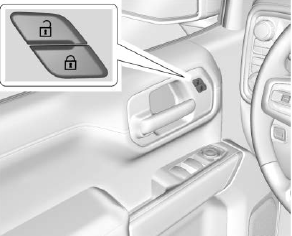
If equipped with power door locks.
 : Press to lock the doors.
