Chevrolet Silverado: Trailering App / Trailer
-
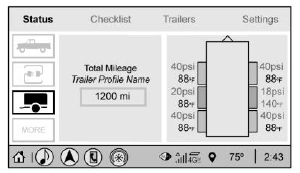
Trailer Tire Pressure/Temperature
-
Mileage of Trailer
Mileage
The mileage accumulated while this Trailer Profile is active will display. Touch mileage to edit.
Tire Pressure and Temperature
If the TTPMS sensor-to-vehicle learn process was completed, the status view will display the current tire pressure and temperature of the trailer tires related to the active Trailer Profile. If a tire’s pressure is low or high, the color of the pressure value will be amber. If a sensor malfunctions, the values are dashed lines. If the screen displays “Service Tire Pressure Monitoring System”, the vehicle needs to be taken to a dealer for service.
 Trailering App
Trailer Light App
If equipped, the Trailer Lights App is on the Home Page of the infotainment display.
Touch Start to cycle the trailer lamps on and off to determine if they are working...
 Maintenance
List of Maintenance Reminders
Add a New Maintenance Reminder
The Maintenance Status view displays reminders. Touch a reminder to edit.
Touch + New Maintenance Reminder to go to the Select New Reminder view...
Other information:
Kia EV2 (QV1, 2026-2026) Owner's Manual: Electronic Stability Control (ESC)
The ESC is designed to stabilize your Kia EV2 when turning to mitigate against loss of control that could lead to an accident. ESC engages the brakes on individual wheels and intervenes with your vehicle management system to stabilize your Kia EV2 safely...
Chevrolet Silverado 2019-2026 Owners Manual: Filling a Portable Fuel Container
Warning Never fill a portable fuel container while it is in the vehicle. Static electricity discharge from the container can ignite the fuel vapor. You or others could be badly burned and the vehicle could be damaged. To help avoid injury to you and others: Dispense fuel only into approved containers...
Categories
- Manuals Home
- 4th Generation Silverado Owners Manual
- 4th Generation Silverado Service Manual
- Power Release Tailgate
- Lower Anchors and Tethers for Children (LATCH System)
- Instrument Panel Overview
- New on site
- Most important about car
Windows
Warning
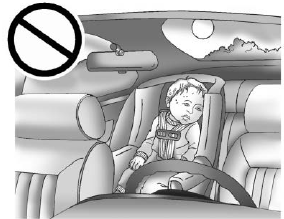
Never leave a child, a helpless adult, or a pet alone in a vehicle, especially with the windows closed in warm or hot weather. They can be overcome by the extreme heat and suffer permanent injuries or even death from heat stroke.