
Kia EV2: Driving electric vehicle / Starting the vehicle
Kia EV2 (QV1, 2026-2026) Owner's Manual / Electric vehicle guide / Driving electric vehicle / Starting the vehicle
- Holding the smart key or registered digital key 2, sit in the driver’s seat.
- Fasten the seat belt before starting the vehicle.
- Apply the parking brake.
- Check the positions of the accelerator and brake pedals and the clearance with your right foot.
- Engage and hold the brake pedal.
- Whilst engaging and holding the brake pedal, shift the gear to P (Park).
- Whilst engaging and holding the brake pedal, press the
EVbutton. - When the
READYindicator light illuminates, you can drive your Kia EV2. If theREADYindicator light is off, you cannot drive the vehicle and must restart it.Figure 1. Vehicle ON to READY (green) 
- Engage and hold the brake pedal and shift the gear to the desired position.
- Release the parking brake and slowly release the brake pedal. Check to see if the vehicle moves slowly, then engage the accelerator pedal.
NOTE
Whilst the charging cable is connected, you cannot shift the gear from P (Park) to any other gear for safety reasons.

 Stopping the vehicle
Park the vehicle and engage and hold the brake pedal.Shift the gear to P (Park).Apply the parking brake.Press the EV button to turn your Kia EV2 OFF.Check to make sure the READY indicator light is off and the parking brake symbol displays on the instrument cluster...
Other information:
Chevrolet Silverado 2019-2026 Owners Manual: Engine Oil Pressure Light (Uplevel Cluster)
Caution Lack of proper engine oil maintenance can damage the engine. Driving with the engine oil low can also damage the engine. The repairs would not be covered by the vehicle warranty. Check the oil level as soon as possible. Add oil if required, but if the oil level is within the operating range and the oil pressure is still low, have the vehicle serviced...
Chevrolet Silverado 2019-2026 Owners Manual: Trailer
Trailer Tire Pressure/Temperature Mileage of Trailer Mileage The mileage accumulated while this Trailer Profile is active will display. Touch mileage to edit. Tire Pressure and Temperature If the TTPMS sensor-to-vehicle learn process was completed, the status view will display the current tire pressure and temperature of the trailer tires related to the active Trailer Profile...
Categories
- Manuals Home
- 4th Generation Silverado Owners Manual
- 4th Generation Silverado Service Manual
- Heated Steering Wheel
- Power Release Tailgate
- Instrument Panel Fuse Block (Right)
- New on site
- Most important about car
Passenger Sensing System
The vehicle has a passenger sensing system for the front outboard passenger position. The passenger airbag status indicator will light on the overhead console when the vehicle is started.
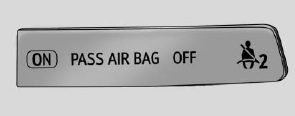
United States
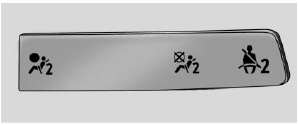
Canada

Copyright © 2026 www.chsilverado.com