Kia EV2: Vehicle to load (V2L) / Connecting V2L
|
|
To safely connect the V2L system on your Kia EV2, follow these steps:
- Open the protective cover of the V2L connector.
- Plug your electronic devices securely into the power outlet and close the cover.
- Connect the V2L adapter into the external charging outlet on your vehicle.
- Press the switch (1) on the V2L connector and verify whether indicator light (2) illuminates or remains off.
The indicator light (2) might fail to illuminate normally under certain specific conditions:
-
Tap the Energy consumption menu on the infotainment system screen of your Kia EV2 to inspect the minimum battery discharging limit set for driving. If this limit exceeds the current state of charge of the battery, light (2) will not illuminate.
-
Check whether the V2L connector status light or the internal power outlet indicator light is functioning properly.
-
A dedicated V2L warning message may appear on your instrument cluster. In such cases, consult the Instrument cluster messages section.
If the V2L system fails to operate correctly when connecting electronic devices, have your vehicle inspected by a qualified professional workshop. Kia strongly recommends visiting an authorized Kia dealer or certified service partner.
-
- To turn off the indicator light (2), press switch (1) again. Once light (2) turns off, press the unlock button on your smart key fob to release the charging door locking mechanism. You can now safely disconnect the V2L connector from your Kia EV2.
To use the interior V2L power outlet inside the cabin, follow these steps:
-
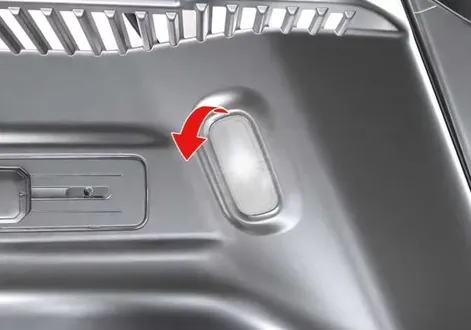
With the EV button positioned in the POWER ON state, connect your equipment to the convenient power outlet located at the base of the rear seat.
-
Slide the protective cover of the interior V2L power outlet smoothly to the left.
-
Verify the operational status by observing the front indicator light on the power outlet module:
-
Blue: Standby mode ready.
-
Red: The power outlet is physically connected, but active power supply is currently unavailable.
-
Green: The power outlet is connected correctly and fully ready to supply electrical power.
-
 Vehicle to load (V2L)
The innovative Vehicle to load (V2L) system transforms your Kia EV2 into a mobile power source, allowing the high-voltage battery to supply standard AC power to a wide variety of electronic appliances and devices...
 Instrument cluster messages
V2L has ended. Battery level has reached the set value
(A) V2L has ended...
Other information:
Chevrolet Silverado 2019-2026 Owners Manual: How to Wear Seat Belts Properly
Follow these rules for everyone's protection. There are additional things to know about seat belts and children, including smaller children and infants. If a child will be riding in the vehicle, see Older Children or Infants and Young Children. Review and follow the rules for children in addition to the following rules...
Chevrolet Silverado 2019-2026 Owners Manual: Overheated Engine Protection Operating Mode
If an overheated engine condition exists and the ENGINE POWER IS REDUCED message displays, an overheat protection mode which alternates firing groups of cylinders helps to prevent engine damage. In this mode, a loss in power and engine performance will be noticed...
Categories
- Manuals Home
- 4th Generation Silverado Owners Manual
- 4th Generation Silverado Service Manual
- Tire Chains
- Heated Steering Wheel
- Power Outlets
- New on site
- Most important about car
Windows
Warning
Never leave a child, a helpless adult, or a pet alone in a vehicle, especially with the windows closed in warm or hot weather. They can be overcome by the extreme heat and suffer permanent injuries or even death from heat stroke.