
Kia EV2: Safe Exit Warning (SEW): (if equipped) / Safe Exit Warning settings
Safe Exit
|
|
Whilst the vehicle power is ON, tap Setup > Vehicle > Driver Assistance > Driving Safety > Safe Exit directly on the touchscreen infotainment system of your Kia EV2 to customize your active preferences.
WARNING
-
If you choose to deselect or disable Safe Exit, the Safe Exit Warning function cannot alert you to hazards. You should always remain fully aware of your immediate surroundings.
-
Do not rely on or use the system when towing a heavy trailer or another vehicle, or when an external carrier or accessory that interferes with sensor operation or alters vehicle balance is installed, as protection may be compromised.
-
When connecting a trailer or equipment carrier, ensure you configure the dedicated trailer menu settings (if equipped). If the driver configures this manually or connection is automatically recognized through genuine accessories, driver assistance capabilities may adapt. Please refer to Driver assistance system limitations and always drive with caution.
TIP
Whenever you turn off and restart your Kia EV2, the Safe Exit Warning system conveniently maintains its last configured user setting.
Warning Methods
|
|
|
To change the Warning Methods settings whilst your Kia EV2 is ON, tap Setup > Vehicle > Driver Assistance > Warning Methods on the infotainment system screen. You can adjust the following personal preferences:
-
Warning Volume: Adjusts the decibel output and volume level of the warning sound.
-
Driving Safety Priority: Automatically lowers all other multimedia and media audio volumes whenever the Driving Safety system triggers an active warning alert.
TIP
-
Your customized Warning Methods selections may also apply across the warning profiles of other active driver assistance systems on your vehicle.
-
Warning Methods retain their last configured states when you switch OFF and restart your vehicle.
-
The configuration settings menu may occasionally be unavailable depending on your specific vehicle package, trim features, and regional market specifications.
 Safe Exit Warning (SEW): (if equipped)
Whilst your vehicle is safely stopped, the advanced Safe Exit Warning system integrated into your Kia EV2 helps you and your passengers avoid potential side collisions by delivering timely visual warning messages and clear audible chimes if it detects a vehicle or cyclist approaching the rear corner blind spot as a door begins to open...
 Safe Exit Warning operation. Warning and control
Warning and control
The Safe Exit Warning system actively issues an intelligent collision prevention warning when occupants attempt to exit the vehicle into active traffic...
Other information:
Chevrolet Silverado 2019-2026 Owners Manual: Event Data Recorders
This vehicle is equipped with an event data recorder (EDR). The main purpose of an EDR is to record, in certain crash or near crash-like situations, such as an air bag deployment or hitting a road obstacle, data that will assist in understanding how a vehicle’s systems performed...
Chevrolet Silverado 2019-2026 Owners Manual: Seat Belts
This section describes how to use seat belts properly, and some things not to do. Warning Do not let anyone ride where a seat belt cannot be worn properly. In a crash, if you or your passenger(s) are not wearing seat belts, injuries can be much worse than if you are wearing seat belts...
Categories
- Manuals Home
- 4th Generation Silverado Owners Manual
- 4th Generation Silverado Service Manual
- Power Outlets
- Head-Up Display (HUD)
- Heated Steering Wheel
- New on site
- Most important about car
Blind Spot Mirrors
If equipped, there is a small convex mirror built into the upper and outer corner of the driver outside mirror. It can show objects that may be in the vehicle's blind zone.
Driving with the Blind Spot Mirror
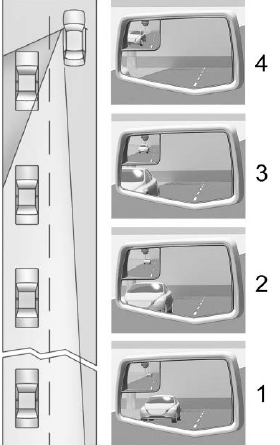
Actual Mirror View
When the approaching vehicle is a long distance away, the image in the main mirror is small and near the inboard edge of the mirror. As the vehicle gets closer, the image in the main mirror gets larger and moves outboard. As the vehicle enters the blind zone, the image transitions from the main mirror to the blind spot mirror. When the vehicle is in the blind zone, the image only appears in the blind spot mirror.