Kia EV2: Rear View Monitor (RVM): (if equipped) / Rear View Monitor operation
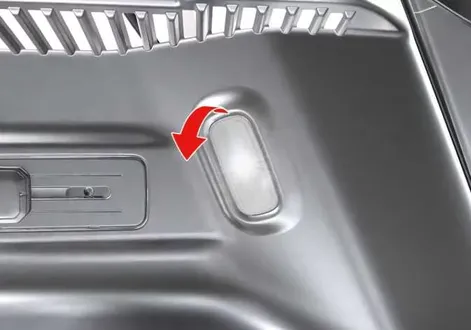
Parking/View button
|
(1) Parking/View button
To turn the Rear View Monitor system ON manually on your Kia EV2, press the physical Parking/View button (1) located on the center console.
To turn the Rear View Monitor system OFF manually, press the Parking/View button (1) a second time.
Rear view
|
|
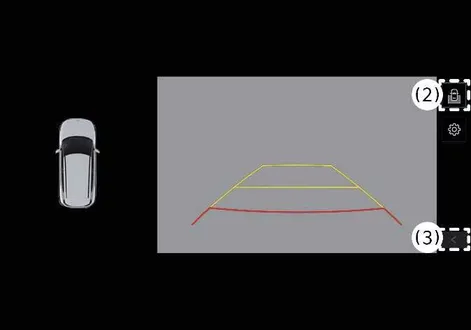
(2) View switching button
(3) back button
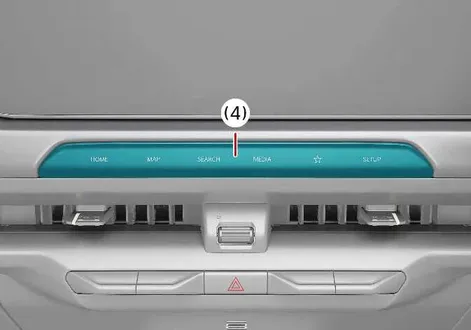
(4) infotainment system operation button
Operating conditions
The Rear View system on your Kia EV2 automatically activates and turns ON under the following specific operational conditions:
-
When you shift the transmission gear selector directly into R (Reverse).
-
When you press the physical Parking/View button (1) while the transmission gear selector is positioned in P (Park) or N (Neutral). If the gear is engaged in N (Neutral), your vehicle speed must remain strictly lower than 10 km/h (6 mph) to safely operate the Rear View function.
To seamlessly switch between Rear Top View, standard Rear View, or Rear Wide View, simply press the dedicated View switching button (2) displayed on the active Rear Top View monitor screen.
Non-operating conditions
The Rear View display automatically turns OFF when you are parking or maneuvering under any of the following circumstances:
-
When you shift the transmission gear selector into P (Park).
-
When you press the physical Parking/View button (1) to toggle the cameras off.
-
When you press the designated back button (3) located directly on the Rear View Monitor display interface.
-
When you press any primary infotainment system operation button (4).
-
When the gear selector is positioned in N (Neutral) or D (Drive) and your vehicle acceleration exceeds a speed of 10 km/h (6 mph).
TIP
As long as your Kia EV2 transmission gear remains engaged in R (Reverse), the active Rear View display will not turn OFF under any circumstances.
Extended Rear View Monitor
To help you park safely and maintain situational awareness, the Extended Rear View Monitor function on your Kia EV2 maintains the active rear camera display feed when you transition the gear selector from R (Reverse) directly into N (Neutral) or D (Drive).
Operating conditions
The Extended Rear View Monitor operates seamlessly whenever you shift the gear from R (Reverse) into N (Neutral) or D (Drive), provided your vehicle travel speed remains strictly below 10 km/h (6 mph).
Non-operating conditions
The Extended Rear View Monitor automatically deactivates and turns OFF under the following conditions:
-
When you shift the transmission gear selector into P (Park).
-
When you press the physical Parking/View button (1).
-
When you press the back button (3) on the active Rear View Monitor screen.
-
When you press the infotainment system operation button (4).
-
When your vehicle driving speed increases above 10 km/h (6 mph).
Rear Top View
|
|
|
(2) View switching button
(3) back button
(4) infotainment system operation button
The Rear Top View feature provides a comprehensive overhead composite image of your Kia EV2 to help you accurately judge the exact distance between your vehicle and surrounding obstacles, walls, or other vehicles while parking.
To turn the Rear Top View function ON, press the designated Rear Top View button on the control interface.
TIP
-
The active Rear View video feed will not turn OFF while the transmission gear is set to Reverse (R), regardless of which specific camera view mode you choose.
-
Both the standard Rear View and Rear Top View can display helpful Rear Parking Guidelines. To enable these guidelines, tap Setup > Vehicle > Driver Assistance > Parking Safety > Camera Settings > Display Information > Rear Parking Guidelines on your infotainment system touchscreen settings menu. Note that dynamic Rear Parking Guidelines are intentionally hidden on the Rear View display during active parking maneuvers.
Rear View Whilst Driving
The rear view whilst driving function on your Kia EV2 turns on under the following specific condition:
-
When your vehicle transmission is engaged in N (Neutral) or D (Drive) and your driving speed is over 10 km/h (6 mph), press the physical Parking/View button (1).
You can effortlessly select either standard Rear View or Rear Wide View by pressing the view switch button (2) located directly on the rear monitor screen.
The rear view whilst driving function turns off automatically in any of the following conditions:
-
Shifting the transmission gear into P (Park).
-
Pressing the physical Parking/View button (1).
-
Pressing the Back button (3) on the rear monitor screen interface.
-
Pressing any infotainment system operation button (4).
NOTE
-
All camera views remain fully active while your Kia EV2 is in R (Reverse); the video feed does not turn off.
-
Whenever the rear monitor system activates, it automatically restores and displays the last used view mode.
-
Rear parking guidelines are clearly displayed in standard Rear View and Rear Top View. However, rear parking guidelines are omitted when using the Rear View whilst driving mode.
-
Once activated, the Rear View whilst driving feature does not turn off even if your vehicle speed temporarily drops below 10 km/h (6 mph).
-
When the Rear View whilst driving mode is active, the Rear Top View function is temporarily disabled.
 Rear View Monitor settings
Warning Methods
Driver Assistance
Warning Methods
To change the Warning Methods settings whilst your Kia EV2 is powered ON, tap Setup > Vehicle > Driver Assistance > Warning Methods on the central infotainment system touchscreen interface...
 Rear View Monitor malfunction and limitations
Rear View Monitor malfunction
When the Rear View Monitor system experiences an electrical fault or hardware malfunction, the live video image on your Kia EV2 screen may abnormally appear tinted green, blue, or completely black...
Other information:
Kia EV2 (QV1, 2026-2026) Owner's Manual: Automatic heating and air conditioning (A/C) operation
Tap the AUTO icon on your interface screen...
Chevrolet Silverado 2019-2026 Owners Manual: Engine Air Filter Life System
If equipped, this feature provides the engine air filter’s remaining life and best timing for a change. The timing to change an engine air filter depends on driving and environmental conditions. When to Change the Engine Air Filter When the Driver Information Center (DIC) displays a message to replace the engine air filter at the next oil change, follow this timing...
Categories
- Manuals Home
- 4th Generation Silverado Owners Manual
- 4th Generation Silverado Service Manual
- Head-Up Display (HUD)
- Folding Mirrors
- Power Outlets
- New on site
- Most important about car
Keys (Key Access)
Warning
Leaving children in a vehicle with the ignition key is dangerous and children or others could be seriously injured or killed. They could operate the power windows or other controls or make the vehicle move. The windows will function with the keys in the ignition, and children or others could be caught in the path of a closing window. Do not leave children in a vehicle with the ignition key.