
Kia EV2: Intelligent Speed Limit Assist (ISLA): (if equipped) / Intelligent Speed Limit Assist settings
You can easily configure and personalize the Intelligent Speed Limit Assist functions on your Kia EV2 by navigating through the infotainment menu: Driver Assistance > Speed Limit in sequential order.
Warning Methods
|
|
To effortlessly customize the Warning Methods configuration on your Kia EV2 while the vehicle power is set to ON, easily navigate through the central infotainment touchscreen by tapping Setup > Vehicle > Driver Assistance > Warning Methods in sequence. This dedicated menu allows you to tailor your driving feedback experience precisely to your personal preferences by adjusting the following parameters:
-
Warning Volume: Adjusts the master auditory output level of the vehicle warning chimes and safety alerts.
-
Overspeed Warning Sound: Enables or disables the audible notification triggered whenever your Kia EV2 exceeds the current local speed limit.
-
Speed Limit Change Alert Sound: Toggles the notification sound that informs you whenever the recognized speed limit changes along your route.
NOTE
-
You can quickly toggle the overspeed warning sound on or off directly while driving by pressing and holding the steering wheel’s mute button.
-
Please note that modifying the master warning volume level may simultaneously alter the audio intensity for other active driver assistance functions across your Kia EV2.
WARNING
For safety compliance, the overspeed warning sound in your Kia EV2 automatically defaults back to the enabled state each time the vehicle is powered off and then powered back on.
When the navigation system is applied
|
|
|
-
Speed Offset Setting: Sets an adaptive offset value relative to the posted speed limit. Speed adjustments and active warnings are calculated dynamically based on the official road speed limit plus your configured offset value.
-
Automatic Assist: Continuously evaluates speed limits and supplementary road signs, issuing immediate alerts if you drive faster than permitted. It can also automatically modulate the set cruising speed of your Manual Speed Limit Assist or Smart Cruise Control on your Kia EV2 to maintain seamless compliance with changing road conditions.
-
Manual Assist: Provides clear information regarding speed limits and supplementary signs, warning you if you exceed the limit. It allows you to conveniently adjust the set speed of your Manual Speed Limit Assist or Smart Cruise Control using the steering wheel (
 ), (
), (  ) switches to adhere to local speed restrictions.
 -
Warning: Delivers informative visual updates regarding active speed limits and supplementary signage, while issuing an audible warning if your Kia EV2 travels faster than the legal threshold.
-
Off: Completely disables Intelligent Speed Limit Assist. When selected, the dedicated speed limit warning indicator (
 ) remains illuminated on your instrument cluster display.
 -
Advanced Assist: Previews upcoming speed limit transitions and remaining distances on your route. When "Automatic Assist" is active, your Kia EV2 will proactively adjust its cruising speed in advance for smooth pre-deceleration.
When the navigation system is not applied
|
|
|
-
Speed Offset Setting: Establishes a custom offset value applied to the detected speed limit. All automated speed adjustments on your Kia EV2 rely on combining the recognized road limit with this user-defined offset value.
-
Country Selection: When real-time navigation data is disabled, this setting allows you to manually specify your driving region from the system menu. Always ensure you select the correct country you are currently driving in to guarantee proper speed limit recognition.
-
Speed Limit Assist: Intelligent Speed Limit Assist informs you of posted speed limits and supplementary road signs, warning you if you drive faster than allowed. It also recommends adjusting the set speed of your Manual Speed Limit Assist or Smart Cruise Control to help you stay safely within legal boundaries.
-
Speed Limit Warning: Intelligent Speed Limit Assist informs you of current speed limits and supplementary road signs while issuing distinct audio-visual warnings whenever your Kia EV2 exceeds the posted speed limit.
-
Off: Disables Intelligent Speed Limit Assist functionality entirely, showing the corresponding speed limit warning indicator (
) on the cluster screen.
CAUTION
If you manually configure this setting to “Off,” the system will automatically revert to “Warning” or “Speed Limit Warning” mode the next time your Kia EV2 is powered off and then powered back on.
NOTE
-
Speed Limit Assist calculates its performance based on an offset value added directly to the baseline speed limit. Set this offset value to “0” if you prefer your Kia EV2 to match the exact posted speed limit without modifications.
-
Please note that Navigation-based Smart Cruise Control operation does not reflect custom adjustments made within the Speed Limit Offset function.
 Intelligent Speed Limit Assist (ISLA): (if equipped)
The sophisticated Intelligent Speed Limit Assist system built into your Kia EV2 combines real-time data captured from detected roadside traffic signs with up-to-date navigation map information to actively inform you of current speed limits and help you maintain safe driving speeds...
 Intelligent Speed Limit Assist operation. Warning and control
Warning and control
The Intelligent Speed Limit Assist system on your Kia EV2 provides comprehensive driver support through the following core warnings and automated control mechanisms:
Displaying the speed limit: Real-time visual updates of current speed limits directly on your instrument cluster...
Other information:
Chevrolet Silverado 2019-2026 Owners Manual: Tire Designations
Tire Size The examples show a typical passenger vehicle and light truck tire size. Passenger (P-Metric) Tire (1) Passenger (P-Metric) Tire : The United States version of a metric tire sizing system. The letter P as the first character in the tire size means a passenger vehicle tire engineered to standards set by the U...
Kia EV2 (QV1, 2026-2026) Owner's Manual: Integrated memory system: (if equipped)
The Integrated Memory System on your Kia EV2 is designed to store and recall preferred driver seating and mirror configurations instantly with a simple button press. Driver’s seat position and posture Outside rearview mirror angles WARNING Never attempt to operate or recall the integrated memory system while your Kia EV2 is moving, as sudden seat or mirror adjustments can cause a momentary loss of vehicle control and lead to a serious accident...
Categories
- Manuals Home
- 4th Generation Silverado Owners Manual
- 4th Generation Silverado Service Manual
- Power Outlets
- Instrument Panel Fuse Block (Left)
- Power Release Tailgate
- New on site
- Most important about car
Passenger Sensing System
The vehicle has a passenger sensing system for the front outboard passenger position. The passenger airbag status indicator will light on the overhead console when the vehicle is started.
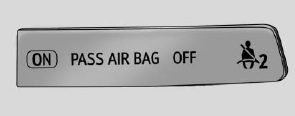
United States
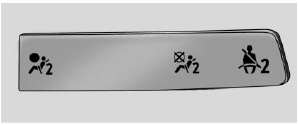
Canada
