
Kia EV2: Intelligent Speed Limit Assist (ISLA): (if equipped) / Intelligent Speed Limit Assist operation. Warning and control
Warning and control
The Intelligent Speed Limit Assist system on your Kia EV2 provides comprehensive driver support through the following core warnings and automated control mechanisms:
-
Displaying the speed limit: Real-time visual updates of current speed limits directly on your instrument cluster.
-
Speeding warning: Instant visual and auditory alerts triggered whenever your vehicle exceeds the legal limit.
-
Changing the set speed: Guidance and manual capability to adjust your cruising speed to match shifting road limits.
-
Auto set speed change: Seamless, automated adjustments to your vehicle's set speed based on live sign recognition.
TIP
Intelligent Speed Limit Assist controls operate effectively based on adjusting the Offset configuration to “0”. For comprehensive details regarding configuring your Offset settings, please refer to the dedicated Intelligent Speed Limit Assist (ISLA) documentation for your Kia EV2.
Displaying the speed limit
|
The high-resolution instrument cluster in your Kia EV2 continuously displays active speed limit information retrieved from navigation data and road sign recognition cameras.
When the “Advanced Assist” profile is active, the system also previews upcoming road speed limits and the remaining distance to the transition point.
When the navigation system is applied, speed limit data is displayed whenever “Automatic Assist,” “Manual Assist,” or “Warning” is selected. When the navigation system is not applied, this data appears when “Speed Limit Assist” or “Speed Limit Warning” is chosen.
TIP
-
If Intelligent Speed Limit Assist cannot clearly recognize speed limit information from the road ahead, your Kia EV2 instrument cluster displays a placeholder ‘---’ sign. Please consult the Intelligent Speed Limit Assist malfunction and limitations section if road signs prove difficult for the optical sensors to identify.
-
Beyond posted speed limits, your Kia EV2 system can provide supplementary road sign information, though the specific signs displayed may vary depending on your geographic region and local traffic regulations.
-
Visual elements, icons, or interface colors may appear differently across various instrument cluster specifications, layout themes, or display options.
-
The supplemental information displayed directly beneath the primary speed limit sign on the cluster indicates specific conditions under which the limit applies (such as weather or time constraints). If this supplemental text cannot be reliably determined, it appears blank on the cluster display (applicable for European specifications).
Speeding warning
|
|
Whenever you drive your Kia EV2 at a velocity higher than the currently displayed speed limit, the corresponding speed sign on the display flashes while an immediate audible warning tone sounds to prompt corrective action.
When the navigation system is applied, this warning behavior functions when “Automatic Assist,” “Manual Assist,” or “Warning” is selected. When navigation is not applied, it functions when “Speed Limit Assist” or “Speed Limit Warning” is selected.
Manual set speed change
|
|
|
When the Manual Assist or Speed Limit Assist menu is active on your Kia EV2, any change in road speed limits while Manual Speed Limit Assist or Smart Cruise Control is engaged triggers an up or down arrow indicator. This prompts you that the cruising set speed should be updated. You can easily adjust the set speed to match the new limit by using the (  ) or (
  ) switch conveniently located on your steering wheel.
Manual set speed adjustments can be performed under the following driving condition:
-
Roads featuring an established speed limit of 30 km/h (20 mph) or higher.
Auto set speed change (if equipped with navigation)
|
|
When the Automatic Assist menu is selected and Manual Speed Limit Assist or Smart Cruise Control is operating on your Kia EV2, the automated set speed adjustment feature activates, highlighting the target speed in green on the instrument cluster. As upcoming road speed limits change, your vehicle adjusts its cruising speed automatically to maintain compliance.
When Advanced Assist is configured, if an upcoming speed limit is lower than your current travel speed, your Kia EV2 reduces the set speed in advance. During this proactive pre-deceleration phase, the upcoming target speed is clearly displayed in green.
Automatic set speed adjustment operates under the following regional criteria:
-
Europe
-
Highways / Motorways: Roads with a designated speed limit of 60 km/h (37 mph) or higher (with a threshold of 70 km/h (45 mph) or higher specifically in Switzerland).
-
General roads: Roads with a speed limit of 30 km/h (20 mph) or higher.
-
-
Australia
-
Highways / Motorways: Roads with a speed limit of 70 km/h (45 mph) or higher.
-
General roads: Roads with a speed limit of 30 km/h (20 mph) or higher.
-
TIP
-
If you prefer to drive below the posted speed limit, you can set your custom offset below “0” or manually press the (
) switch to decrease your vehicle's set speed accordingly. -
Even when the set speed of Manual Speed Limit Assist or Smart Cruise Control matches the posted road limit, dynamic driving conditions may occasionally cause your Kia EV2 to exceed the limit. Always remain attentive to surrounding traffic and apply brakes manually when road circumstances require it.
-
Intelligent Speed Limit Assist functions based on the measurement unit selected on your cluster. If your cluster unit settings differ from the regional standard of the country you are driving in, the system may experience operational errors. Exercise care when altering speed units.
TIP
-
When navigating through sections of German autobahns or highways lacking a fixed speed limit, your Kia EV2 retains and utilizes the target speed established during the previous unrestricted stretch for seamless transitions (applying to both automatic and manual adjustments).
-
For more detailed operational guidelines regarding Manual Speed Limit Assist, please consult the Manual Speed Limit Assist (MSLA) manual section.
-
For more detailed operational guidelines regarding Smart Cruise Control, please consult the Smart Cruise Control (SCC) manual section.
 Intelligent Speed Limit Assist settings
You can easily configure and personalize the Intelligent Speed Limit Assist functions on your Kia EV2 by navigating through the infotainment menu: Driver Assistance > Speed Limit in sequential order...
 Intelligent Speed Limit Assist malfunction and limitations
Intelligent Speed Limit Assist malfunction
Check Driver Assistance system...
Other information:
Kia EV2 (QV1, 2026-2026) Owner's Manual: Precautions
WARNING To reduce the chance of serious or fatal injuries and receive the maximum safety benefit from your restraint system in your Kia EV2. Never place a child in any child or booster seat in the front seat of your Kia EV2...
Kia EV2 (QV1, 2026-2026) Owner's Manual: Interior care
Use the comprehensive information and technical guidelines outlined in the following sections to maintain the luxurious cabin and upholstery of your Kia EV2 in pristine condition. Proper interior maintenance preserves the aesthetic appeal and high-end feel of your modern electric vehicle...
Categories
- Manuals Home
- 4th Generation Silverado Owners Manual
- 4th Generation Silverado Service Manual
- Heated Steering Wheel
- E85 or FlexFuel
- Electronic Stability Control (ESC) Off Light
- New on site
- Most important about car
Power Mirrors
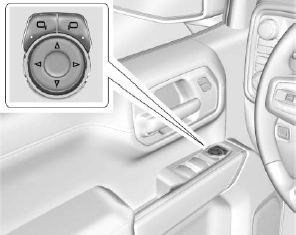
To adjust each mirror:
Press  or
or
 to select the driver or passenger side
mirror. The indicator light will illuminate.
to select the driver or passenger side
mirror. The indicator light will illuminate.
