
Kia EV2: Forward Attention Warning (FAW): (if equipped) / Forward Attention Warning settings: (if equipped)
Warning Methods
|
|
To configure the custom Warning Methods settings while your Kia EV2 is powered ON, navigate through the central touchscreen by selecting Setup > Vehicle > Driver Assistance > Warning Methods on the infotainment system interface. This menu allows you to tailor your alert preferences:
-
Warning Volume: Adjusts the audio output level of the warning chimes to suit your personal preference.
-
Haptic Warning: Turns ON the steering wheel vibration feedback to provide tactile alerts alongside audible warnings.
-
Driving Safety Priority: Automatically lowers all active media and navigation audio volumes whenever a primary Driving Safety system issues an urgent warning.
-
Forward attention warning sound: Activates the dedicated audible alert designed to notify you of front-facing attention lapses in your Kia EV2.
-
Inattentive driving warning sound: Activates the specialized audible alert triggered during prolonged periods of driver distraction.
TIP
-
Your chosen Warning Methods configurations may also apply globally to the alert behaviors of other integrated driver assistance systems across your Kia EV2.
-
Configured Warning Methods seamlessly retain their last user-selected preferences even after you turn OFF and restart the vehicle.
-
Please note that the specific Warning Methods configuration menu options may vary depending on the specific vehicle trim level or regional software version.
-
The forward attention warning sound defaults back to the active ON state automatically every time the Kia EV2 is restarted.
Forward attention warning
|
|
|
With the vehicle system powered on, select Setup > Vehicle > Driver assistance > DAW (Driver Attention Warning) > Forward attention warning within the infotainment display to enable or disable this active monitoring function in your Kia EV2.
-
Forward attention warning: Actively monitors eye and head orientation to caution the driver whenever focus drifts away from the forward roadway.
TIP
The Forward Attention Warning feature in your Kia EV2 will always re-engage and turn on automatically whenever the vehicle undergoes a complete power restart cycle.
 Forward Attention Warning (FAW): (if equipped)
Forward Attention Warning utilizes an advanced in-cabin optical camera to help prevent the driver from becoming distracted whilst driving your Kia EV2, providing timely audible chimes and visual warning lights...
 Forward Attention Warning operation
Forward Attention Warning
Keep your eyes on the road and drive carefully...
Other information:
Kia EV2 (QV1, 2026-2026) Owner's Manual: Nearby charging stations
To effortlessly search for nearby charging stations along your path, simply tap the dedicated map icon on the central infotainment system screen of your Kia EV2...
Chevrolet Silverado 2019-2026 Owners Manual: Additional Storage Features
Cargo Tie-Downs This vehicle is equipped with 12 fixed cargo tie-downs. Caution The truck bed walls will collapse if the tie-downs are overloaded. Any of the 12 locations inside the truck bed can be used. The maximum load per corner is 227 kg (500 lb)...
Categories
- Manuals Home
- 4th Generation Silverado Owners Manual
- 4th Generation Silverado Service Manual
- Heated Steering Wheel
- Power Outlets
- Power Release Tailgate
- New on site
- Most important about car
Passenger Sensing System
The vehicle has a passenger sensing system for the front outboard passenger position. The passenger airbag status indicator will light on the overhead console when the vehicle is started.
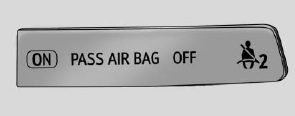
United States
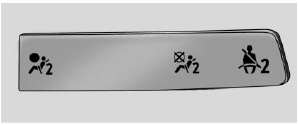
Canada
