
Kia EV2: EV menu / EV settings
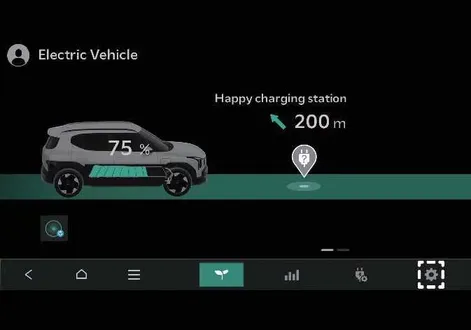
|
-
The charging limit.
-
The charging current.
-
Battery conditioning mode.
-
Utility mode.
Charging limit
|
|
-
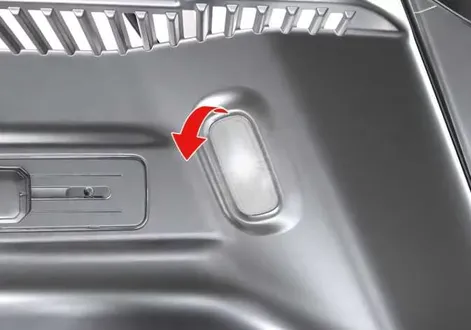
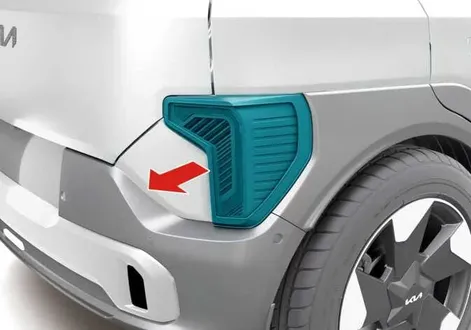
You can set the target battery charge level when charging with an AC or DC charger.
-
You can adjust the charging level within 10%.
-
The high voltage battery does not charge if the target battery charge level is lower than the high voltage battery’s charge level.
Charging current
|
|
|
-
You can adjust the charging current for an AC charger. Select an appropriate charging current.
-
If the charging process does not start or abruptly stops in the middle of charging, select another proper current and try charging the vehicle again.
-
Charging time varies depending on which charging current you select.
-
In the case of some AC high-capacity chargers (chargers with a current capacity greater than the current capacity that the vehicle can receive), the charging current might not change even if you change the setting.
Utility mode
The vehicle uses the high voltage battery instead of the 12V battery to operate convenience features. When driving is not necessary, such as when you are camping or stopping the vehicle for an extended period of time, you can use the electrical features (audio, lights, air conditioner, heater, and so on) for many hours.
|
|
System setting
You can activate the Utility mode function when the vehicle has met the following conditions:
-
The EV button is in the POWER ON or the DRIVE READY position.
-
The Electronic Parking Brake (EPB) is not malfunctioning.
-
The gear is in P (Park).
System activation
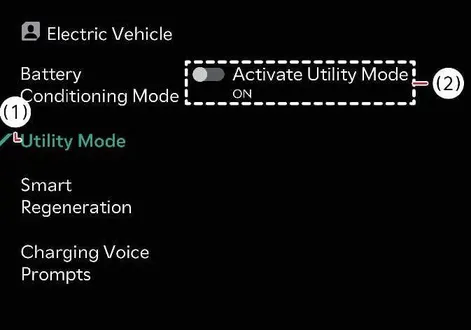
To activate utility mode, tap EV > EV Setting > Utility mode > Activate utility mode on the infotainment system screen.
When the utility mode is active:
-
The UTIL indicator displays on the instrument cluster and the EPB is applied.
-
You can use electric devices but you cannot drive the vehicle.
-
You can press the EPB switch to cancel the EPB.
-
You cannot shift the gear out of P (Park). If you attempt to shift the gear, the message Shifting conditions not met displays on the infotainment system screen.
System deactivation
-
Pressing the EV button without engaging the brake turns the vehicle OFF.
-
Pressing the EV button whilst engaging the brake switches the vehicle to its DRIVE READY state.
-
To deactivate the utility mode, tap EV > EV Setting > Utility mode on the infotainment system screen and then tap OFF. After confirming that you would like to deactivate the Utility mode, tap Yes to deactivate it. Then the vehicle turns OFF.
Battery conditioning mode: (if equipped)
|
|
|
-
If the high voltage battery temperature is too high or too low, the charging performance may deteriorate.
If you set a DC charging station as a destination or waypoint on the navigation, system, the Battery Conditioning function automatically operates by considering the estimated arrival time to help ensure DC charging performance at room temperature.
-
On the infotainment system screen, the manual switch displays the operating status of the Battery Conditioning mode and allows you to turn the function on or off.
-
You can control the Battery Conditioning function remotely whilst the vehicle is parked. The function ends when the battery temperature reaches the optimal range or after 30 minutes.
-
The power used to adjust the battery temperature may reduce the driving distance. It also takes time to reach the optimal battery temperature.
The Battery Conditioning function does not operate to secure driving distance when the battery charge level is low. It also does not operate if the battery temperature is already ideal for DC charging.
NOTE
-
Battery conditioning mode is only available for vehicles equipped with a battery heater.
-
The infotainment system might change after software updates. For more information, refer to the manual provided in the infotainment system and the quick reference guide.
 Instrument cluster messages
V2L has ended. Battery level has reached the set value
(A) V2L has ended...
 Charge types for electric vehicle
Charging information
AC charge
You can effortlessly charge your Kia EV2 by connecting to a standard AC charger installed at your residence or an accessible public charging station, ensuring reliable daily energy replenishment...
Other information:
Chevrolet Silverado 2019-2026 Owners Manual: Shifting out of Park
This vehicle is equipped with an electronic shift lock release system. The system is designed to prevent movement of the shift lever out of P (Park), unless the brake pedal is applied and the ignition is on or in Service Mode. The shift lock release is always functional except in the case of an uncharged or low voltage – less than 9 volt – battery...
Kia EV2 (QV1, 2026-2026) Owner's Manual: Junction Turning function
The specialized Junction Turning functional capabilities integrated into the advanced Forward Collision-Avoidance Assist suite of the Kia EV2 comprise: Collision Warning Emergency Braking Stopping vehicle and ending brake control Collision Warning Collision Warning Collision Warning can proactively alert you with the Forward Safety warning light blinking (), a detailed warning message, an audible notification, and physical steering wheel vibration...
Categories
- Manuals Home
- 4th Generation Silverado Owners Manual
- 4th Generation Silverado Service Manual
- Electronic Stability Control (ESC) Off Light
- E85 or FlexFuel
- Power Release Tailgate
- New on site
- Most important about car
Passenger Sensing System
The vehicle has a passenger sensing system for the front outboard passenger position. The passenger airbag status indicator will light on the overhead console when the vehicle is started.
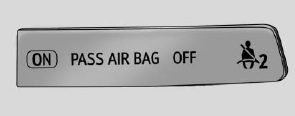
United States
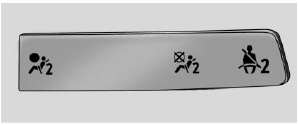
Canada
