Kia EV2: Driving your vehicle / EV button. Starting the vehicle
|
OFF
-
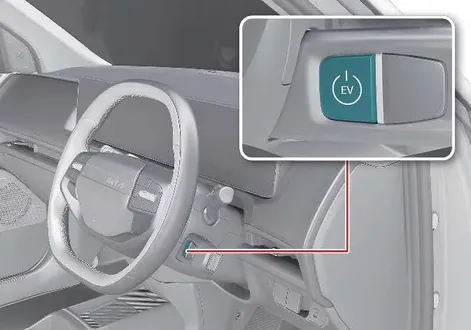
To completely shut down your Kia EV2 from a DRIVE READY or POWER ON state, bring the vehicle to a complete standstill, shift into P (Park), and press the EV button firmly while keeping your foot applied to the brake pedal.
CAUTION
In an emergency situation whilst the vehicle is in motion, you can turn the vehicle off and set it to the POWER ON position by pressing the EV button for more than 2 seconds, or 3 times repeatedly within 3 seconds. If the vehicle is still moving, restart it by pressing the EV button whilst the speed is above approximately 5 km/h (3 mph).
NOTE
-
When you start the vehicle whilst shifting to R (Reverse), D (Drive), or N (Neutral), the vehicle automatically shifts to P (Park) and then turns off.
-
You can only turn the vehicle off when it is not in motion.
Anti-theft steering column lock
-
To protect you from theft, the steering wheel locks when the EV button is in the OFF position.
-
The steering wheel also locks when you open the door.
-
If the steering wheel does not lock properly when you open the driver side door, the warning chime sounds. Try locking the steering wheel again. If that does not solve the problem, have your vehicle inspected by a professional workshop. Kia recommends visiting an authorised Kia dealer or service partner.
-
Additionally, the steering wheel does not lock and the warning chime sounds if you press the EV button in the OFF position after opening the driver side door. In this situation, close the door so that the steering wheel locks and the warning chime stops.
NOTE
If the steering wheel does not unlock properly, the EV button does not work. Press the EV button whilst turning the steering wheel right and left to release the tension.
TIP
-
You can only turn the vehicle on or off by pressing the EV button in POWER ON position when your vehicle is not in motion.
-
If your vehicle is in motion during an emergency, you can turn the vehicle off by pressing the EV button in the OFF position for more than 2 seconds, or 3 times repeatedly within 3 seconds.
If your vehicle is still moving, you can restart it by pressing the EV button when the vehicle speed is 5 km/h (3 mph) or above.
POWER ON
-
Press the EV button once without engaging the brake pedal.
-
Check the warning lights.
NOTE
-
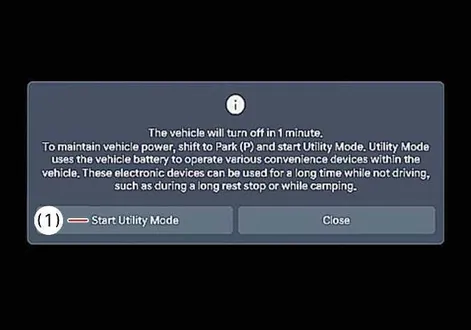
Within 14 minutes after the vehicle is in the POWER ON position, the infotainment system screen displays the menu shown below. To continue using the vehicle power, tap Start Utility Mode.
-
Start Utility Mode
-
-
If you maintain POWER ON for 15 minutes without converting to utility mode, the vehicle power turns off.
-
If you use the high voltage battery charging and outdoor V2L features with POWER ON, utility mode operates and the vehicle power does not turn off.
-
You can change the infotainment system through updates. For more information, refer to Over-The-Air (OTA) software update.
DRIVE READY
-
With the vehicle OFF or in the POWER ON state, press the EV button and engage the brake pedal whilst the vehicle is in P (Park).
WARNING
-
Never press the EV button whilst the vehicle is in motion. Doing so could result in loss of directional control and braking function and cause an accident.
-
Before leaving the driver’s seat, always make sure to shift to P (Park), fully apply the parking brake, and turn the vehicle off. The vehicle might move suddenly and unexpectedly if you do not take these precautions.
-
Never reach for the EV button or any other controls through the steering wheel whilst the vehicle is in motion. The presence of your hand or arm in this area could cause you to lose control of the vehicle, resulting in an accident, serious bodily injury, or death.
-
Do not place any movable objects around the driver’s seat, as they might move, interfere with your driving, and lead to an accident.
NOTE
If you press the EV button without engaging the brake pedal, the vehicle does not start, and the EV button changes as follows: OFF > POWER ON > OFF
Starting the vehicle
-
Always ensure you carry your authorized smart key with you before approaching your Kia EV2.
-
Verify that the electronic parking brake is securely engaged.
-
Confirm that the vehicle transmission is properly set to P (Park).
-
Firmly depress and hold the foot brake pedal.
-
Press the EV button. Once the vehicle system successfully boots up, the READY indicator will illuminate on your digital cluster.
WARNING
Do not start the vehicle with the accelerator pedal depressed. The vehicle can move and lead to an accident.
CAUTION
To prevent damage to the vehicle:
-
If the READY indicator turns off whilst you are in motion, do not attempt to shift to P (Park).
If traffic and road conditions permit, you may shift to N (Neutral) whilst the vehicle is still moving and press the EV button in an attempt to restart the vehicle.
-
Do not push or tow your vehicle to start the vehicle.
NOTE
-
The vehicle will start by pressing the EV button, only when the smart key is in the vehicle.
-
Even when the smart key is in the vehicle, if it is far away from the driver, the vehicle may not start.
-
When the EV button is in the POWER ON or DRIVE READY state, and any door is open, the system checks for the smart key. If the smart key is not in the vehicle, the indicator (
 ) and the message will appear on the instrument cluster. When all doors are closed, the chime will also sound for about 5 seconds. Keep the smart key in the vehicle when in the POWER ON state.
Starting the vehicle with smart key
At the time that the vehicle doors are opened or when the EV button is pressed, your Kia EV2 will automatically scan the cabin for the presence of the smart key.
If the smart key is not in your vehicle, the (  ) indicator and the message appear on the instrument cluster. If all doors are closed, the chime sounds for 5 seconds. The indicator or chime turns off whilst your vehicle is moving. Always have the smart key with you.
WARNING
The vehicle only starts when the smart key is in your vehicle. Never allow a child or any person who is unfamiliar with your vehicle to touch the EV button or related parts. Pressing the EV button whilst the smart key is in your vehicle may result in unintended vehicle operation or vehicle movement.
CAUTION
-
If the vehicle turns off whilst your vehicle is in motion, do not attempt to shift to P (Park). If traffic and road conditions permit, you may shift to N (Neutral) whilst your vehicle is still moving, and press the EV button to attempt to restart the vehicle.
-
Do not press the EV button for more than 10 seconds except when the stop lamp fuse is blown.
TIP
-
If you leave the vehicle in the POWER ON position for a long time, the 12V battery discharges.
-
If you enter the vehicle with the smart key or digital key (UWB) (if equipped) whilst the Target Temperature function is operating, the vehicle switches to the DRIVE READY state. To switch to the DRIVE READY state without the smart key or digital key, you must place the NFC card or digital key (if equipped) on the charging pad, then close the door or engage the brake pedal.
If you close the door or engage the brake pedal whilst the smart key or digital key (if equipped) is not inside the vehicle, the instrument cluster displays a related warning message. Be careful after switching to the DRIVE READY state, as the vehicle might move if you shift from P (Park) to another gear position.
-
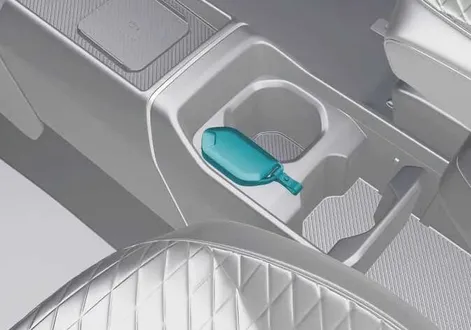
If the smart key battery is weak or the smart key does not work correctly, you can start the vehicle by placing the smart key on the key recognition area (
 ) located on the centre console and then pressing the EV button for about 10 seconds in OFF position.
 -
If the brake light fuse is blown, you cannot start the vehicle normally.
Replace the fuse with a new one. If this is not possible, start the vehicle by pressing the EV button in the OFF position for 10 seconds. The vehicle can start without the brake pedal engaged, but for your safety, always engage the brake pedal before starting the vehicle.
 Before driving
Before stepping into your Kia EV2, take a brief moment to walk around and inspect both the vehicle and its immediate surroundings. Once you are seated inside, performing a structured series of pre-drive checks ensures maximum safety, comfort, and reliability before you set your vehicle in motion...
 Shift lever
Electric vehicles transmit the rotation of the motor to the wheel through the reducer.
Shift lever operation
Select the gear position by turning the shift lever...
Other information:
Chevrolet Silverado 2019-2026 Owners Manual: Engine Exhaust
Warning Engine exhaust contains carbon monoxide (CO), which cannot be seen or smelled. Exposure to CO can cause unconsciousness and even death. Exhaust may enter the vehicle if: The vehicle idles in areas with poor ventilation (parking garages, tunnels, deep snow that may block underbody airflow or tail pipes)...
Chevrolet Silverado 2019-2026 Owners Manual: Windows
Warning Never leave a child, a helpless adult, or a pet alone in a vehicle, especially with the windows closed in warm or hot weather. They can be overcome by the extreme heat and suffer permanent injuries or even death from heat stroke. The vehicle aerodynamics are designed to improve fuel economy performance...
Categories
- Manuals Home
- 4th Generation Silverado Owners Manual
- 4th Generation Silverado Service Manual
- Lower Anchors and Tethers for Children (LATCH System)
- Instrument Panel Overview
- Tire Chains
- New on site
- Most important about car
Folding Mirrors
Manual Folding Mirrors
If equipped, push the mirror toward the vehicle to fold. Push the mirror outward to return to its original position.
Manually fold the mirrors inward to prevent damage when going through an automatic car wash.
Power Folding Mirrors