
Chevrolet Silverado: Warning Lights, Gauges, and Indicators / Driver Mode Control Light
Chevrolet Silverado 2019-2026 Owners Manual / Instruments and Controls / Warning Lights, Gauges, and Indicators / Driver Mode Control Light

This light comes on when Sport Mode is selected (1500 Series).

This light comes on when Snow/Ice Mode is selected.

This light comes on when Terrain Mode is selected (1500 Series).

This light comes on when Off-Road Mode is selected.
 Engine Coolant Temperature Warning Light
This light comes on briefly while starting the vehicle.
If it does not, have the vehicle serviced by your dealer. If the system is working
normally the indicator light goes off...
 Tire Pressure Light
For vehicles with the Tire Pressure Monitor System (TPMS), this light comes on
briefly when the engine is started. It provides information about tire pressures
and the TPMS...
Other information:
Kia EV2 (QV1, 2026-2026) Owner's Manual: Storage compartments
You can use the versatile storage compartments conveniently located throughout the cabin of the Kia EV2 to store small personal items belonging to the driver or passengers: To avoid possible theft or unwanted break-ins, never leave valuable personal items unattended in the storage compartments...
Kia EV2 (QV1, 2026-2026) Owner's Manual: Instrument cluster display for warning message
The instrument cluster on your Kia EV2 displays each of the following warning messages when applicable: An EPB warning appears and an audible warning sounds in the following conditions: You try to drive by engaging the accelerator pedal with the EPB applied, but the EPB doesn’t release automatically...
Categories
- Manuals Home
- 4th Generation Silverado Owners Manual
- 4th Generation Silverado Service Manual
- Programming Transmitters to the Vehicle
- Driver Information Center (DIC) (Midlevel and Uplevel)
- Tire Chains
- New on site
- Most important about car
Power Mirrors
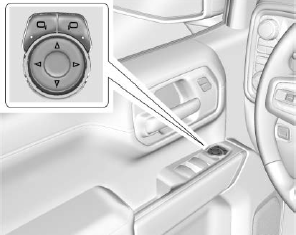
To adjust each mirror:
Press  or
or
 to select the driver or passenger side
mirror. The indicator light will illuminate.
to select the driver or passenger side
mirror. The indicator light will illuminate.

Copyright © 2026 www.chsilverado.com