
Kia EV2: Driver Attention Warning (DAW) / Driver Attention Warning settings
Leading Vehicle Departure Alert
|
|
Whilst your vehicle is ON, navigate through the central touchscreen by tapping Setup > Vehicle > Driver Assistance > Driver Attention Warning > Leading Vehicle Departure Alert on the infotainment system screen.
-
Leading Vehicle Departure Alert: When enabled, the Driver Attention Warning system on your Kia EV2 will inform you promptly whenever a detected vehicle standing in front departs from a complete stop.
Warning Methods
|
|
|
To customize your preferred Warning Methods settings whilst the vehicle is ON, tap Setup > Vehicle > Driver Assistance > Warning Methods on the infotainment system screen. You can adjust the following parameters to suit your driving preferences:
-
Warning Volume: Adjusts the overall acoustic volume level of the vehicle safety warning sounds.
-
Inattentive Driving Warning Sound: Specifically adjusts the volume level of the audio tones associated with inattentive driving alerts.
-
Driving Safety Priority: Automatically dips and lowers all other multimedia and entertainment audio volumes whenever a driving safety system triggers an active warning.
TIP
-
Your customized Warning Methods configurations may also apply to the warning behavior of other integrated driver assistance systems across your Kia EV2.
-
Warning Methods retain your last configured settings automatically when you turn OFF and subsequently restart your vehicle.
-
The specific Warning Methods configuration menu layout and options may vary depending on vehicle trim levels and regional specifications.
 Driver Attention Warning (DAW)
Inattentive Driving Warning function
The advanced Driver Attention Warning system in your Kia EV2 continuously tracks and analyzes your driving patterns, steering inputs, and overall vehicle dynamics...
 Driver Attention Warning operation
Inattentive Driving Warning function
The foundational active safety function of the Driver Attention Warning suite on your Kia EV2 is the Taking a break feature...
Other information:
Kia EV2 (QV1, 2026-2026) Owner's Manual: Scheduled maintenance service for Kia EV2
Normal maintenance schedule - for Australia and New Zealand You must perform the following comprehensive maintenance services to ensure optimal vehicle performance, safety, and reliability of your Kia EV2. Keep detailed receipts for all professional vehicle services and repairs to fully protect your factory warranty...
Kia EV2 (QV1, 2026-2026) Owner's Manual: Child Restraint System (CRS)
Our recommendation: Children always in the rear WARNING Always properly restrain children in the vehicle. Children of all ages are significantly safer when riding in the rear seats of your Kia EV2. Never place a rearward-facing Child Restraint System on the front passenger seat unless the front passenger air bag has been completely and officially deactivated...
Categories
- Manuals Home
- 4th Generation Silverado Owners Manual
- 4th Generation Silverado Service Manual
- Driver Information Center (DIC) (Base Level)
- Instrument Panel Fuse Block (Right)
- Power Release Tailgate
- New on site
- Most important about car
Passenger Sensing System
The vehicle has a passenger sensing system for the front outboard passenger position. The passenger airbag status indicator will light on the overhead console when the vehicle is started.
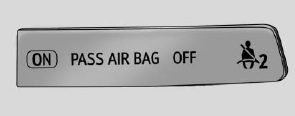
United States
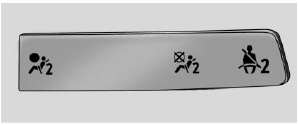
Canada
