
Chevrolet Silverado: Connected Services
Chevrolet Silverado 2019-2026 Owners Manual / Connected Services
 OnStar Additional Information
In-Vehicle Audio Messages
Audio messages may play important information at the following times:
Prior to vehicle purchase. Press
to set up an account...
 Navigation
Navigation requires a specific OnStar or connected service plan.
Press to receive Turn-by-Turn directions
or have them sent to the vehicle’s navigation screen, if equipped...
Other information:
Chevrolet Silverado 2019-2026 Owners Manual: Electronic Stability Control (ESC) Off Light
This light comes on briefly while starting the engine. If it does not, have the vehicle serviced by your dealer. This light comes on when the ESC system is turned off. If ESC is off, the Traction Control System (TCS) is also off. If the ESC and TCS are off, the system does not assist in controlling the vehicle...
Kia EV2 (QV1, 2026-2026) Owner's Manual: Smart regeneration system malfunction and limitations
Smart regeneration system malfunction Check smart recuperation system The following message will appear when the smart regeneration system in your Kia EV2 is not functioning normally during everyday driving operations...
Categories
- Manuals Home
- 4th Generation Silverado Owners Manual
- 4th Generation Silverado Service Manual
- Head-Up Display (HUD)
- Power Release Tailgate
- Instrument Panel Overview
- New on site
- Most important about car
Power Mirrors
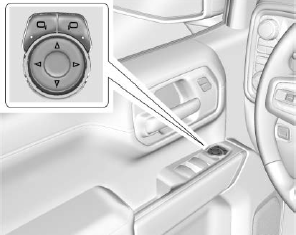
To adjust each mirror:
Press  or
or
 to select the driver or passenger side
mirror. The indicator light will illuminate.
to select the driver or passenger side
mirror. The indicator light will illuminate.

Copyright © 2026 www.chsilverado.com