
Kia EV2: Electric vehicle guide / Charging connector lock. Locking charging cable
Locking charging cable
|
|
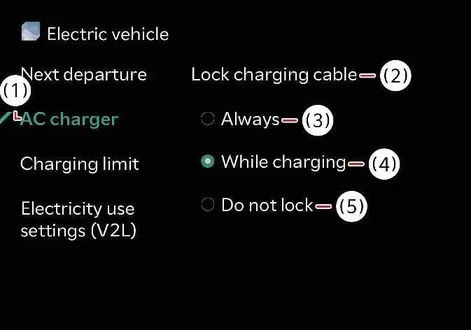
You can seamlessly select one of the available protection modes to ensure your charging connector remains securely locked or unlocked within the vehicle inlet during various daily parking scenarios with your Kia EV2.
Navigate through your vehicle display by tapping Electric Vehicle > Reserved Charging icon > AC Charger directly on the central infotainment system screen to customize these preferences.
TIP
Infotainment software interfaces and menu layouts may evolve following periodic system updates. For additional context, consult the comprehensive digital manual integrated within your infotainment display alongside your quick reference guide.
When the charging connector is locked
|
Category |
Lock whilst charging |
Always lock |
Do not lock |
|---|---|---|---|
|
Before charging |
X |
O |
X |
|
Whilst charging |
O |
O |
X |
|
Finished charging |
X |
O |
X |
Always Lock mode
The connector locks immediately when you plug the charging cable into the charging inlet of your Kia EV2. It stays securely locked until you unlock the vehicle doors, making the Always Lock setting ideal for preventing unauthorized removal or theft of your valuable charging cable.
-
The charging connector will automatically re-lock if you unlock all doors but fail to unplug the charging cable within a 15-second window.
-
The charging connector also automatically re-locks if you unlock all doors and the connector, and then subsequently lock the doors back up.
Lock Whilst Charging mode
The charging connector automatically engages its lock mechanism the moment your Kia EV2 starts taking in power, and unlocks automatically as soon as the energy transfer is complete. This mode is particularly useful for public charging stations where you want secure locking during active replenishment without hassle afterward.
Do Not Lock mode
The connector remains unlocked regardless of the current charging phase or vehicle status. To detach the charging cable, simply press the manual release button on the connector. Exercise extra caution regarding public security when using this mode to prevent cable theft.
 Charge indicator light for electric vehicle. Charging status
Charging status
When charging the high voltage battery of your Kia EV2, the current charging status can be instantly checked from outside the vehicle by observing the dedicated LED indicator light...
 Scheduled charging
You can effortlessly configure a tailored charging schedule for your Kia EV2 using either the central infotainment display, the Kia App, or the connected mobile portal...
Other information:
Chevrolet Silverado 2019-2026 Owners Manual: Convex Mirrors & Manual Mirrors
Convex Mirrors Warning A convex mirror can make things, like other vehicles, look farther away than they really are. If you cut too sharply into the right lane, you could hit a vehicle on the right. Check the inside mirror or glance over your shoulder before changing lanes...
Kia EV2 (QV1, 2026-2026) Owner's Manual: Motor Driven Power Steering (MDPS)
The Motor Driven Power Steering system in your Kia EV2 utilizes an advanced electric motor to seamlessly assist you in steering the vehicle with minimal physical effort. If the vehicle ignition is turned off or if the power steering assist system encounters an unexpected interruption, you can still manually steer the Kia EV2, though doing so will require significantly increased steering effort...
Categories
- Manuals Home
- 4th Generation Silverado Owners Manual
- 4th Generation Silverado Service Manual
- Heated Steering Wheel
- Head-Up Display (HUD)
- Folding Mirrors
- New on site
- Most important about car
Child Restraint Systems
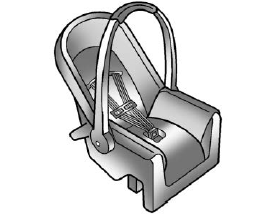
Rear-Facing Infant Restraint
A rear-facing child restraint provides restraint with the seating surface against the back of the infant.
