Kia EV2: Audio system / USB port
Utilize the built-in USB ports conveniently located within the cabin of your Kia EV2 to plug in flash storage devices, connect compatible mobile electronics, or power up external accessories.
|
-
You can seamlessly connect external audio players, smartphones, or storage media directly to the primary USB port (1) of your Kia EV2 using a compatible data cable.
-
Once a media storage device, such as a digital MP3 player or USB flash drive, is successfully recognized, you can browse and play your favorite music collections directly through the vehicle's high-fidelity speakers and integrated infotainment system (1).
-
Compact electronic accessories and mobile gadgets can also be efficiently charged using the dedicated USB power port (2). For further technical specifications and charging capacities, refer to the dedicated USB charger section of the manual.
NOTE
-
Certain high-draw external devices or non-standard accessories may not charge properly or may display a charging error when connected to the vehicle's USB interface.
-
When using a portable media player that is simultaneously connected to an auxiliary power outlet and the audio input, electrical grounding loops may introduce unwanted background noise or static during playback. If this interference occurs, disconnect the external charging cable and rely solely on the portable device's internal battery power source.
 Shark-fin antenna
The aerodynamic shark-fin antenna integrated into the roofline of your Kia EV2 is engineered to reliably transmit and receive critical communication signals, including AM/FM radio frequencies and Global Positioning System (GPS) data...
 How vehicle radio works
Transmitter towers strategically positioned throughout your metropolitan area broadcast clear AM and FM radio signals. The specialized radio antenna integrated into your Kia EV2 intercepts these ambient waves, allowing the onboard audio system to process the signals and deliver crisp, high-fidelity sound directly through your vehicle speakers...
Other information:
Kia EV2 (QV1, 2026-2026) Owner's Manual: Rear View Monitor settings
Warning Methods Driver Assistance Warning Methods To change the Warning Methods settings whilst your Kia EV2 is powered ON, tap Setup > Vehicle > Driver Assistance > Warning Methods on the central infotainment system touchscreen interface...
Chevrolet Silverado 2019-2026 Owners Manual: Passenger Airbag Status Indicator
The vehicle has a passenger sensing system. See Passenger Sensing System 0 75 for important safety information. The overhead console has a passenger airbag status indicator. United States Canada When the vehicle is started, the passenger airbag status indicator will light ON and OFF, or the symbols for on and off, for several seconds as a system check...
Categories
- Manuals Home
- 4th Generation Silverado Owners Manual
- 4th Generation Silverado Service Manual
- Instrument Panel Fuse Block (Right)
- Head-Up Display (HUD)
- Driver Information Center (DIC) (Base Level)
- New on site
- Most important about car
Keys (Key Access)
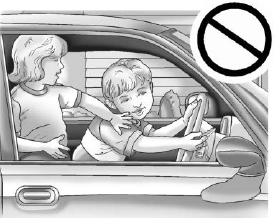
Warning
Leaving children in a vehicle with the ignition key is dangerous and children or others could be seriously injured or killed. They could operate the power windows or other controls or make the vehicle move. The windows will function with the keys in the ignition, and children or others could be caught in the path of a closing window. Do not leave children in a vehicle with the ignition key.