
Kia EV2: Infotainment system / Over-The-Air (OTA) software update
The advanced Over-The-Air (OTA) software update feature allows you to wirelessly download and install the latest system packages directly onto your Kia EV2. Using this convenient functionality, you can keep your vehicle's software ecosystem consistently up to date without visiting a service center. To receive and process OTA updates on your Kia EV2, an active Kia Connect service subscription is required.
Downloading software
The newest software packages can be downloaded automatically in the background whilst you are driving your Kia EV2. Once download is complete, a clear notification appears on your smartphone through the Kia App or Kia Connect app, as well as on the vehicle infotainment display, informing you that an update package is ready for installation. The next time you power down your Kia EV2, you will be given the option to initiate the update process immediately or postpone it.
Approving software update
|
|
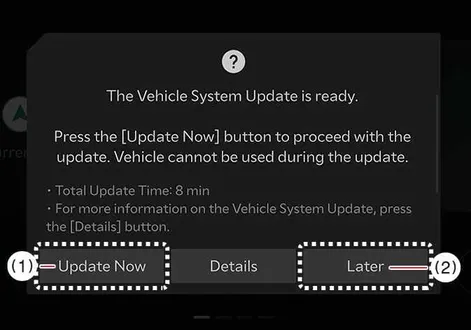
After you switch off the ignition, the vehicle system presents an interactive prompt allowing you to manage the installation timing for your Kia EV2.
-
To begin the installation process immediately, press Update Now (1).
-
To defer the installation for a later time, press Later (2).
Preparing software update
|
|
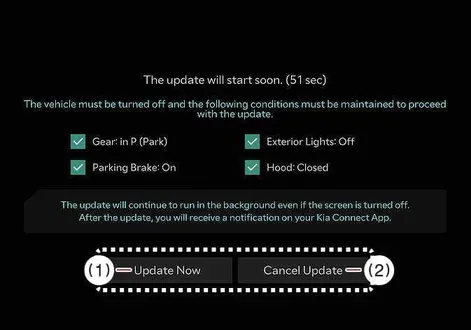
If you select the Update Now button on the screen, your Kia EV2 will begin checking pre-requisites and installing the update automatically. To ensure a successful installation, the following strict operational conditions must be satisfied:
-
The vehicle power must be set to the OFF position.
-
The gear selector must be securely engaged in P (Park).
-
The electronic parking brake must be fully applied.
-
All exterior lighting fixtures must be switched off.
-
The bonnet must be completely closed and latched.
-
The vehicle's 12V auxiliary battery must maintain sufficient charge.
-
The specific electronic systems targeted for updating must not be actively running.
-
To launch the update sequence instantly, press Update Now.
-
To abort the process before execution, press Cancel Update.
TIP
The onboard computer of your Kia EV2 automatically performs a pre-check of the battery voltage and system status before proceeding.
Updating software
|
|
You can monitor the live progress percentage of the update directly on the cabin screen of your Kia EV2. Do not be alarmed if the display temporarily powers down and restarts during various stages of the flash installation.
Once the package is fully installed, you will receive a completion notification on your smartphone via the Kia App or Kia Connect app, as well as a confirmation prompt on the vehicle display.
TIP
-
To conserve auxiliary power, the display screen turns off automatically after 3 minutes of inactivity. You can wake the screen to check the update progress at any time by pressing the EV button inside your Kia EV2.
-
You are free to lock up and exit your Kia EV2 safely once the update process has successfully begun.
-
The Over-The-Air (OTA) software update feature is an exclusive benefit reserved for active Kia Connect service subscribers.
-
The specific release notes and update details may vary depending on the prior software version installed on your vehicle.
-
If an unexpected interruption causes an update failure, the system will automatically initiate a safe recovery routine. To retry the installation after recovery completes, press the Start button on the screen to let your Kia EV2 attempt the update again. If both the update and automatic recovery fail, schedule an inspection at a professional workshop. Kia recommends visiting an authorized dealer or service partner.
-
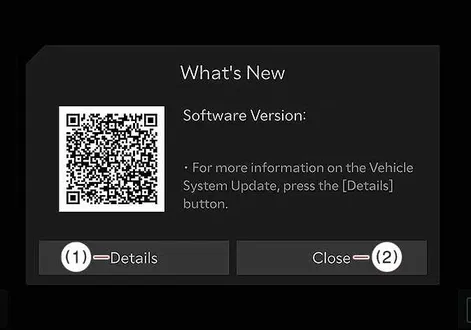
When the update finishes, a success message appears on the screen. Tap Details or scan the provided QR Code to review complete release information.
TIP
-
Observe the following mandatory restrictions while your Kia EV2 is updating:
-
You cannot drive or operate the vehicle during the installation window. Plan accordingly and ensure your Kia EV2 is safely parked before launching the update.
-
Remote vehicle control features, including remote start and climate conditioning, are temporarily unavailable.
-
High-voltage charging is disabled during updates; always charge your Kia EV2 either before or after the installation process.
-
The Rear Occupant Alert system may be suspended, so always verify visually that the rear seats are clear after the update starts.
-
If digital key modules are included in the package, smartphone or fingerprint door locking functions might temporarily be unresponsive. Review the release notes, and use your physical smart key button to secure or unlock the doors if necessary.
-
-
The update will cancel itself automatically if any baseline vehicle condition changes prior to execution.
-
Once the update sequence has officially commenced, it cannot be manually cancelled.
-
The OTA update feature will be locked out if any unauthorized modifications or custom software patches have been applied to your Kia EV2.
-
Never open the bonnet or disconnect the vehicle battery while an update is underway, as doing so will cause installation failure.
-
The high-voltage power conversion module responsible for maintaining the 12V battery may cycle on automatically during the update.
-
If any diagnostic tool, scanner, or third-party dongle is plugged into the On-board Diagnostic (OBD) port, the Kia EV2 will block the update. Remove the diagnostic hardware from the OBD terminal and restart the vehicle to proceed.
-
Cellular reception status must be verified to ensure a stable data link before downloading or applying software.
-
A strong cellular signal strength (maintaining above -82 dBm) is required to safely download and install software packages on your Kia EV2.

 Audio system
NOTE
If you choose to install an aftermarket High Intensity Discharge (HID) headlight system on your Kia EV2, please be aware that electromagnetic interference may cause your vehicle’s advanced audio and sensitive electronic control devices to malfunction...
Other information:
Kia EV2 (QV1, 2026-2026) Owner's Manual: Reverse Parking Collision-Avoidance Assist operation
Turning ON or OFF Press and hold the dedicated Parking Safety button () on your console for more than 2 seconds to toggle the advanced Parking Collision-Avoidance Assist system ON or OFF according to your preference...
Chevrolet Silverado 2019-2026 Owners Manual: Heated and Ventilated Front Seats
Warning If temperature change or pain to the skin cannot be felt, the seat heater may cause burns. To reduce the risk of burns, use care when using the seat heater, especially for long periods of time. Do not place anything on the seat that insulates against heat, such as a blanket, cushion, cover, or similar item...
Categories
- Manuals Home
- 4th Generation Silverado Owners Manual
- 4th Generation Silverado Service Manual
- Power Outlets
- Heated Steering Wheel
- Electronic Stability Control (ESC) Off Light
- New on site
- Most important about car
Vehicle Alarm System
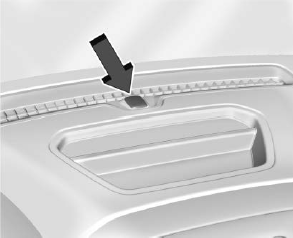
The indicator light, on the instrument panel near the windshield, indicates the status of the system.
