
Kia EV2: Instrument cluster / Driver Assistance settings (infotainment system)
Kia EV2 (QV1, 2026-2026) Owner's Manual / Driver adjustments / Instrument cluster / Driver Assistance settings (infotainment system)
|
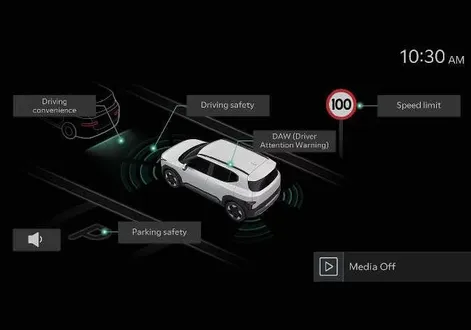
Select Setup > Vehicle > Driver Assistance on the infotainment system screen to set the Driver Assistance function.
-
Driver Assistance
-
Driving Convenience
-
Speed Limit
-
Warning Methods
-
DAW (Driver Attention Warning)
-
Driving Safety
-
Parking Safety
TIP
The infotainment system may change after software updates. For more information, refer to the manual provided in the infotainment system and the quick reference guide.
-
 LCD display modes
View
Description
Driving Assist view
Displays information related to Driver assistance system
Navigation view
Displays information related to navigation system
Utility information view
Displays information related to driving, warning, etc...
 LCD display messages
Door, bonnet, tailgate, sunroof open
This warning is displayed on the instrument panel indicating precisely which door, the bonnet, the tailgate or the sunroof remains open before driving your Kia EV2...
Other information:
Kia EV2 (QV1, 2026-2026) Owner's Manual: Seat belt restraint system
WARNING To guarantee maximum restraint system protection while driving your Kia EV2, the seat belts must always be securely worn by every occupant whenever the vehicle is in motion. Seat belts deliver their highest level of safety performance and crash energy distribution only when the seatbacks are adjusted to a fully upright position...
Chevrolet Silverado 2019-2026 Owners Manual: Head-Up Display (HUD)
Warning If the HUD image is too bright or too high in your field of view, it may take you more time to see things you need to see when it is dark outside. Be sure to keep the HUD image dim and placed low in your field of view. If equipped with HUD, some information about the operation of the vehicle is projected onto the windshield...
Categories
- Manuals Home
- 4th Generation Silverado Owners Manual
- 4th Generation Silverado Service Manual
- Instrument Panel Overview
- Instrument Panel Fuse Block (Left)
- Tire Chains
- New on site
- Most important about car
Passenger Sensing System
The vehicle has a passenger sensing system for the front outboard passenger position. The passenger airbag status indicator will light on the overhead console when the vehicle is started.
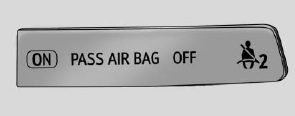
United States
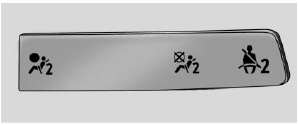
Canada

Copyright © 2026 www.chsilverado.com