
Kia EV2: Driving your vehicle / Drive mode integrated control system
The drive mode integrated control system allows the driver to select the drive mode appropriate for the surrounding environment in the Kia EV2.
DRIVE MODE
You may select the drive mode according to preference or road condition.
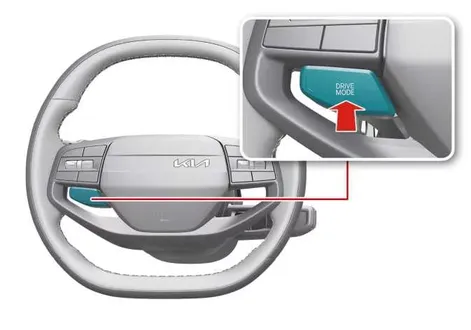
|
-
Press the DRIVE MODE button. The drive mode changes whenever you press the button.
-
DRIVE MODE will change to NORMAL mode when the vehicle is restarted.
-
Depending on the region, the vehicle switches to ECO mode or NORMAL mode upon restart.
|
DRIVE MODE |
Characteristics |
|---|---|
|
ECO |
Helps improve efficiency for eco-friendly driving. |
|
NORMAL |
Provides smooth driving and a comfortable ride. |
|
SPORT |
Provides sporty riding. |
|
SNOW |
DRIVE MODE selectable for each preferred component within the theme system. |
DRIVE MODE characteristics
DRIVE MODE
|
Characteristics |
High electric energy economy mode designed to optimize range and efficiency in your Kia EV2 |
Normal driving mode providing a balanced everyday driving experience |
Sporty driving mode offering sharper throttle response and dynamic performance |
Snow driving mode tailored for enhanced traction and stability on slippery winter surfaces |
|
Button activation |
Press |
Press |
Press |
Press |
|
Cluster indicator |
|
- |
|
|
|
Regenerative braking level |
0–3 (Existing value maintained regardless of drive mode) |
0–1 |
||



Infotainment system
|
Climate system control |
ECO/NORMAL* |
NORMAL |
NORMAL |
NORMAL |
|
Brake mode |
NORMAL/SPORT* (Mode can be set in infotainment system regardless of drive mode) |
|||
NOTE
-
If there is a problem with the instrument cluster, the drive mode will default to NORMAL mode and may not change to ECO mode or SPORT mode in your Kia EV2.
-
Efficiency depends on the driver's driving habits, external environment, and road condition.
-
In SPORT mode, the electric energy economy may decrease due to higher performance demands.
TIP
-
It is possible to set the climate system control and brake mode separately to match your personal preferences.
Select Settings > Vehicle > Drive Mode > Brake mode or ECO Mode Climate Control from the infotainment system.
-
The infotainment system interface may change after software updates. For more information, refer to the manual provided in the infotainment system and the quick reference guide.
 Brake Assistant System (BAS)
The BAS provides additional pressure when you momentarily and strongly engage the brake pedal in situations where sudden braking is required on your Kia EV2...
 Active Air Flap (AAF)
Active Air Flap (AAF) controls the air flap below the front bumper to cool vehicle parts efficiently and improve overall energy economy for your Kia EV2...
Other information:
Chevrolet Silverado 2019-2026 Owners Manual: Front & Rear Axle
Front Axle When to Check Lubricant It is not necessary to regularly check the front axle fluid unless a leak is suspected or an unusual noise is heard. A fluid loss could indicate a problem. Have it inspected and repaired. This service can be complex...
Kia EV2 (QV1, 2026-2026) Owner's Manual: Driver Attention Warning operation
Inattentive Driving Warning function The foundational active safety function of the Driver Attention Warning suite on your Kia EV2 is the Taking a break feature. Taking a break Consider taking a break The Inattentive Driving Warning indicator light ( ) blinks on the instrument cluster, a descriptive pop-up warning message appears, and a distinct chime sounds to suggest that you take a rest break whenever your evaluated attention level drops below acceptable safety standards...
Categories
- Manuals Home
- 4th Generation Silverado Owners Manual
- 4th Generation Silverado Service Manual
- Power Seat Adjustment
- Electronic Stability Control (ESC) Off Light
- Folding Mirrors
- New on site
- Most important about car
Vehicle Alarm System
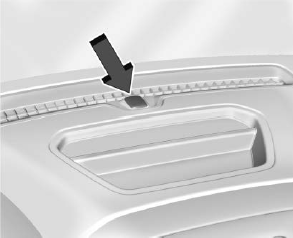
The indicator light, on the instrument panel near the windshield, indicates the status of the system.
