
Chevrolet Silverado: Front Seats / Lumbar Adjustment
Chevrolet Silverado 2019-2026 Owners Manual / Seats and Restraints / Front Seats / Lumbar Adjustment
Power Lumbar
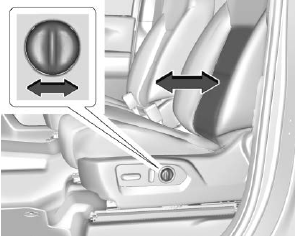
To adjust the lumbar support, if equipped:
- Press and hold the control forward to increase or rearward to decrease upper and lower lumbar support at the same time.
 Power Seat Adjustment
To adjust a power seat, if equipped:
Move the seat forward or rearward by sliding the control forward or rearward.
Raise or lower the front part of the seat cushion by moving the front of
the control up or down...
 Reclining Seatbacks
Warning
Sitting in a reclined position when the vehicle is in motion can be dangerous.
Even when buckled up, the seat belts cannot do their job.
The shoulder belt will not be against your body...
Other information:
Kia EV2 (QV1, 2026-2026) Owner's Manual: Safe Exit Warning (SEW): (if equipped)
Whilst your vehicle is safely stopped, the advanced Safe Exit Warning system integrated into your Kia EV2 helps you and your passengers avoid potential side collisions by delivering timely visual warning messages and clear audible chimes if it detects a vehicle or cyclist approaching the rear corner blind spot as a door begins to open...
Chevrolet Silverado 2019-2026 Owners Manual: Lockout Protection
If equipped, the ignition is on or in ACC/ACCESSORY and the power door lock switch is pressed with the driver door open, all the doors will lock and only the driver door will unlock. If the vehicle is off and locking is requested while a door is open, when all doors are closed the vehicle will check to the Keyless Access function (if equipped)...
Categories
- Manuals Home
- 4th Generation Silverado Owners Manual
- 4th Generation Silverado Service Manual
- Driver Information Center (DIC) (Base Level)
- Driver Information Center (DIC) (Midlevel and Uplevel)
- Instrument Panel Fuse Block (Left)
- New on site
- Most important about car
Folding Mirrors
Manual Folding Mirrors
If equipped, push the mirror toward the vehicle to fold. Push the mirror outward to return to its original position.
Manually fold the mirrors inward to prevent damage when going through an automatic car wash.
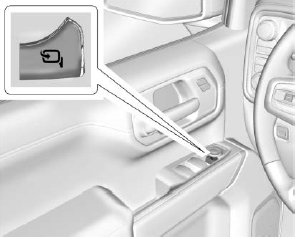
Power Folding Mirrors

Copyright © 2026 www.chsilverado.com