
Chevrolet Silverado: Instruments and Controls / Information Displays
Chevrolet Silverado 2019-2026 Owners Manual / Instruments and Controls / Information Displays
- Driver Information Center (DIC) (Base Level)
- Driver Information Center (DIC) (Midlevel and Uplevel)
- Head-Up Display (HUD)

 Driver Information Center (DIC) (Base Level)
The DIC displays are shown in the center of the instrument cluster. The displays
show the status of many vehicle systems. The trip odometer reset stem in the instrument
cluster is used to access the DIC menu items...
Other information:
Chevrolet Silverado 2019-2026 Owners Manual: Tire Pressure Monitor Operation
This vehicle may have a Tire Pressure Monitor System (TPMS). The TPMS is designed to warn the driver when a low tire pressure condition exists. TPMS sensors are mounted onto each tire and wheel assembly, excluding the spare tire and wheel assembly...
Kia EV2 (QV1, 2026-2026) Owner's Manual: Manual Speed Limit Assist (MSLA). Manual Speed Limit Assist operation
Speed Limit indicator Set speed You can easily set a specific speed limit on your Kia EV2 whenever you wish to restrict your maximum cruising velocity and avoid driving over a predetermined speed...
Categories
- Manuals Home
- 4th Generation Silverado Owners Manual
- 4th Generation Silverado Service Manual
- Instrument Panel Fuse Block (Right)
- Instrument Panel Overview
- Driver Information Center (DIC) (Midlevel and Uplevel)
- New on site
- Most important about car
Power Mirrors
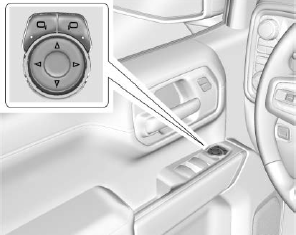
To adjust each mirror:
Press  or
or
 to select the driver or passenger side
mirror. The indicator light will illuminate.
to select the driver or passenger side
mirror. The indicator light will illuminate.

Copyright © 2026 www.chsilverado.com