
Kia EV2: Brake system / AUTO HOLD
The AUTO HOLD function keeps your Kia EV2 still, even if you do not continue to hold your foot on the brake pedal after you have engaged it, to bring your vehicle to a complete stop.
Applying AUTO HOLD function
|
|
-
Engage the brake pedal and start your vehicle.
-
Press the AUTO HOLD button. The white AUTO HOLD indicator light appears, indicating that the system is in standby.
Before the AUTO HOLD function engages, you must close the driver's side door and the bonnet.
NOTE
-
When you come to a complete stop by engaging the brake pedal, the AUTO HOLD indicator light changes from white to green, indicating that AUTO HOLD is engaged. Your vehicle remains at a standstill even if you release the brake pedal.
-
If the EPB is applied, AUTO HOLD will be released.
-
If you engage the accelerator pedal with the vehicle in D (Drive), the AUTO HOLD function is released automatically, and your vehicle starts to move. The AUTO HOLD indicator light changes from green to white, indicating that the AUTO HOLD function is in standby and the EPB is released.
-
When driving after releasing AUTO HOLD by engaging the accelerator pedal, always check your surroundings.
-
Engage the accelerator pedal slowly for a smooth forward motion.
Cancelling AUTO HOLD function
|
|
-
To cancel AUTO HOLD function, press the AUTO HOLD button. The AUTO HOLD indicator turns OFF.
-
To cancel AUTO HOLD function when your Kia EV2 is at a standstill, press the AUTO HOLD switch whilst engaging the brake pedal.
WARNING
To reduce the risk of an unexpected accident, do not activate AUTO HOLD whilst driving downhill, backing up, or parking your Kia EV2.
NOTE
-
If the AUTO HOLD indicator light turns yellow, the AUTO HOLD function is not working properly. Have your vehicle inspected by a professional workshop. Kia recommends visiting an authorised Kia dealer or service partner.
-
If there is a malfunction with the driver side door or bonnet open detection system, the AUTO HOLD function may not work properly. Have your vehicle inspected by a professional workshop. Kia recommends visiting an authorised Kia dealer or service partner.
-
You may hear a click or electric brake motor whine sound whilst engaging or releasing the EPB. This is normal and indicates that the EPB is functioning properly.
TIP
-
AUTO HOLD does not engage under the following conditions (the AUTO HOLD indicator light does not turn green, and the AUTO HOLD function remains in standby):
-
You open the driver side door.
-
You open the bonnet.
-
You shift to P (Park).
-
You apply the EPB.
-
-
AUTO HOLD automatically switches to EPB under any of the following conditions (the AUTO HOLD indicator light remains white and the EPB applies automatically):
-
You open the driver side door.
-
You open the bonnet.
-
Your vehicle is at a standstill for more than 10 minutes.
-
Your vehicle is at a standstill on a steep slope.
-
You moved your vehicle for a few seconds.
In these cases, the brake warning light appears, the AUTO HOLD indicator light changes from green to white, a warning sounds, and a message appears to inform you that the EPB has been applied automatically. Before driving your Kia EV2 again, engage the brake pedal, check your surroundings, and use the EPB switch to manually release the parking brake.
-
Instrument cluster display for warning message
The instrument cluster on your Kia EV2 displays each of the following warning messages when applicable:
When you apply the EPB from AUTO HOLD:
|
|
|
When the conversion from AUTO HOLD to the EPB does not work properly:
|
|
|
NOTE
When this message appears, the AUTO HOLD function and the EPB may not operate. For your safety, engage the brake pedal.
If you do not engage the brake pedal when you release the AUTO HOLD function by pressing the AUTO HOLD button, a warning sounds and a message appears:
|
|
When you press the AUTO HOLD button whilst the driver side door and bonnet are open, a warning sounds and a message appears:
|
|
Press the AUTO HOLD button after closing the driver side door and bonnet.
 EPB malfunction indicator
If your Kia EV2 is in POWER ON position, and the vehicle turns off after approximately 3 seconds whilst the system is operating normally, the following warning light appears...
 Good braking practices
Good braking practices help keep occupants safe and extend the life of your brakes, ensuring peak reliability every time you drive your Kia EV2.
Check to be sure that the parking brake is not applied and the parking brake indicator light is off before driving your Kia EV2...
Other information:
Chevrolet Silverado 2019-2026 Owners Manual: How Does an Airbag Restrain?
In moderate to severe frontal or near frontal collisions, even belted occupants can contact the steering wheel or the instrument panel. In moderate to severe side collisions, even belted occupants can contact the inside of the vehicle. Airbags supplement the protection provided by seat belts by distributing the force of the impact more evenly over the occupant's body...
Chevrolet Silverado 2019-2026 Owners Manual: Starter Switch Check
Warning When you are doing this inspection, the vehicle could move suddenly. If the vehicle moves, you or others could be injured. Before starting this check, be sure there is enough room around the vehicle. Apply both the parking brake and the regular brake...
Categories
- Manuals Home
- 4th Generation Silverado Owners Manual
- 4th Generation Silverado Service Manual
- Electronic Stability Control (ESC) Off Light
- Power Seat Adjustment
- E85 or FlexFuel
- New on site
- Most important about car
Blind Spot Mirrors
If equipped, there is a small convex mirror built into the upper and outer corner of the driver outside mirror. It can show objects that may be in the vehicle's blind zone.
Driving with the Blind Spot Mirror
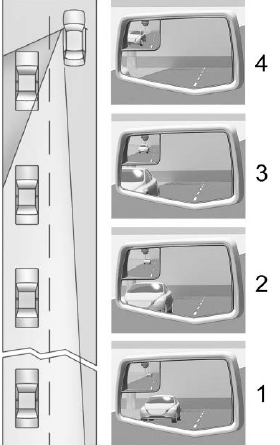
Actual Mirror View
When the approaching vehicle is a long distance away, the image in the main mirror is small and near the inboard edge of the mirror. As the vehicle gets closer, the image in the main mirror gets larger and moves outboard. As the vehicle enters the blind zone, the image transitions from the main mirror to the blind spot mirror. When the vehicle is in the blind zone, the image only appears in the blind spot mirror.